



Authors

Threat actors are increasingly exploiting legitimate cloud services to evade detection and streamline the deployment of their scam infrastructure. Cloud hosting services and decentralized networks have become primary platforms for hosting phishing pages and sites. Throughout 2025 and 2026, we have observed phishing operators steadily migrate toward platforms like Cloudflare Workers, Vercel, Netlify, GitHub Pages, and IPFS. This post analyzes the mechanics of a real-life adversary-in-the-middle (AitM) attack in a cloud environment and presents detailed statistics on the platforms and domains phishers abuse most frequently.
The cloud as a safe haven for phishers
Threat actors select platform-as-a-service (PaaS) offerings and distributed cloud environments to host phishing sites for much the same reasons legitimate software developers do:
- Inherent trust and reputation. Phishing pages hosted on reputable platforms appear trustworthy, reducing suspicion among potential victims.
- Most platforms offer generous free-tier developer plans. The onboarding process takes minutes and rarely requires Know Your Customer (KYC) identity verification. This enables a single operator to create hundreds of malicious accounts.
- Evasion and anonymity. Attackers leverage native security features to obscure their true origin server IP address behind a CDN, which complicates detection for security vendors.
Additionally, these platforms allocate shared subdomains hosting millions of legitimate projects and websites. Security teams cannot simply block the parent domain or its subdomains without inflicting collateral damage on bona fide users – a limitation that malicious actors take advantage of. To counter this tactic, security vendors must advance content-based analysis methodologies.
Multi-stage AitM attack
Consider a modern AitM phishing campaign that leverages Cloudflare Workers, a widely adopted cloud platform. The attackers execute the operation through multiple HTML pages distributed across a compromised website and the cloud platform. Each page serves a specific function: harvesting target email addresses, initializing the reverse-proxy infrastructure, or spoofing the login form to capture multi-factor authentication (MFA) sessions.
Stage 1. Contact harvesting and network monitoring evasion
The attack typically begins with a phishing email that uses a plausible pretext – such as a request from a coworker to review documents – to entice the target into clicking a malicious link.
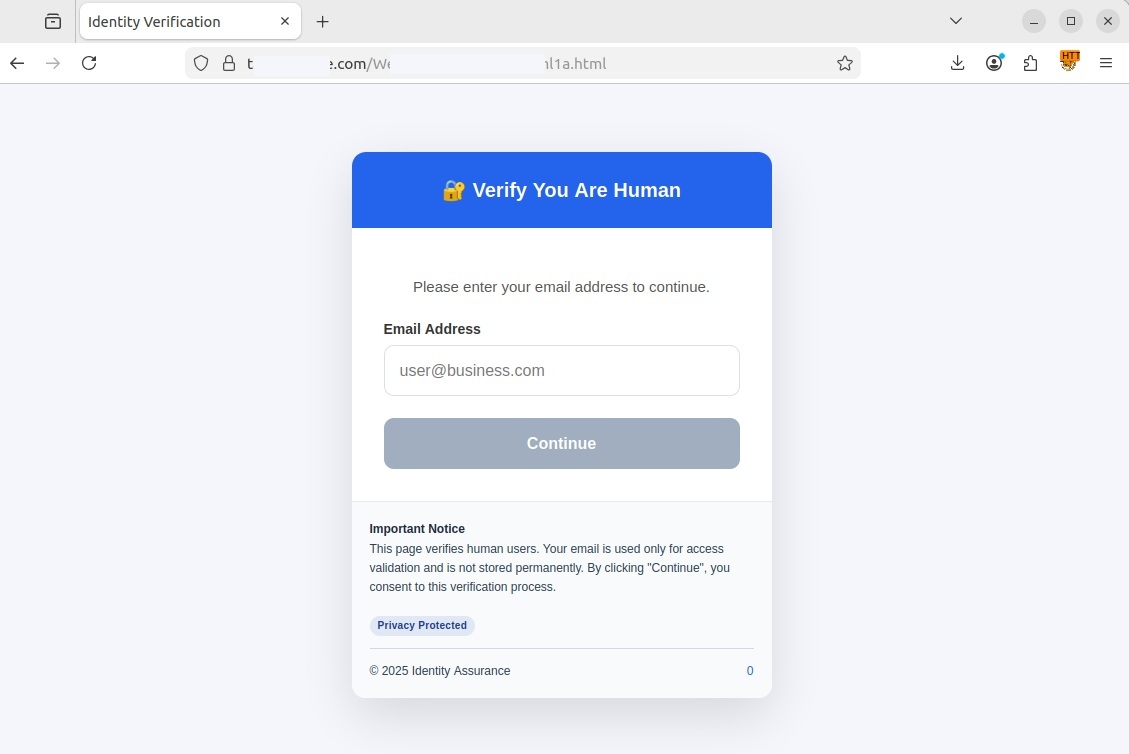
Upon clicking the link, the user is redirected to a fake CAPTCHA landing page hosted on a compromised legitimate website. This specific campaign used the https://t[REDACTED]e.com website, but any other variations are possible. In this scenario, the compromised page served as a disposable relay — vendor detection mechanisms typically block phishing links delivered directly via email much faster — to prevent the early discovery of the core phishing content hosted on Cloudflare.
If the user entered their email address and clicked Continue, the pseudo-CAPTCHA marked them as a human user and initiated a redirect. The primary objective of this stage is to harvest target email addresses, filter out bots, and route legitimate users to a subdomain of workers.dev. Such subdomains are generated automatically and free of charge by Cloudflare Workers. The victim’s email address was embedded in the URL hash (the part of the URL following the # character), allowing the page at [REDACTED].workers.dev to extract the email without issuing a request to the attacker’s server, thereby avoiding detection.

Stage 2. Initializing a transparent proxy
The user’s browser then loaded a [REDACTED].workers.dev page with #user@business.com at the end of the URL. At this point, the page presented the victim with a genuine CAPTCHA challenge. This step ensured that an actual user was interacting with the page rather than a security sandbox.
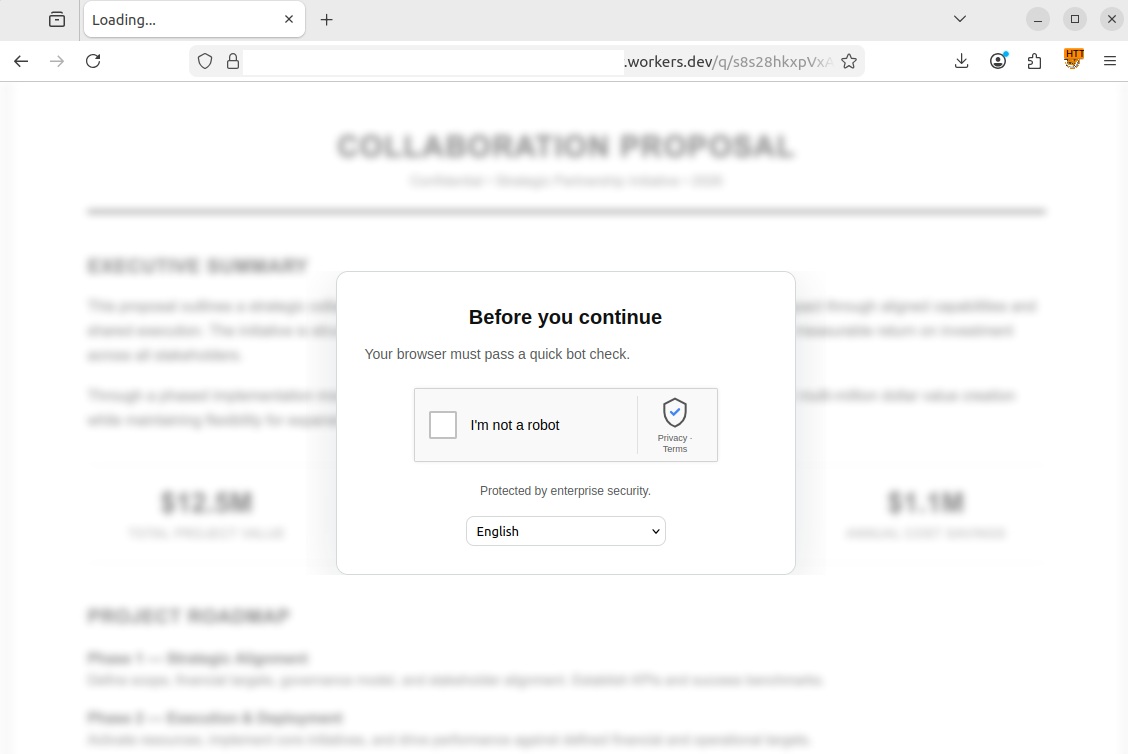
Another CAPTCHA, this time a legitimate one
Once the user successfully completed the challenge, a service worker was registered in their browser. This is a special JavaScript file capable of running in the background and intercepting all network requests generated by the current tab. As this type of script was designed as a core component of progressive web apps (PWAs) to optimize load times and support offline functionality, browsers treat service workers as standard site feature and execute them without prompting for user consent as long as the website uses an HTTPS connection.
The attackers leveraged the service worker to deploy Ultraviolet, a legitimate open-source web proxy library, to dynamically rewrite all links and forms on the page. This forced every outgoing request – including those for Microsoft login credentials – to route through the attackers’ server rather than directly to the legitimate services.
Immediately upon loading, the page extracted the victim’s email address from the URL hash and stored it in the browser’s sessionStorage property so it would not be overwritten when the CAPTCHA loaded. This step also allowed the script to pre-fill the username field in the form automatically. A pre-populated login field enhanced the page’s credibility and bolstered user trust. Once the CAPTCHA was passed, the malicious script constructed a redirect URL for the third stage, appending the email retrieved from sessionStorage back to the hash. By passing the email via the URL hash across three consecutive stages, the attackers successfully kept it hidden from network attack detection systems.
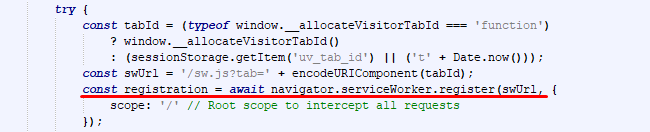
Registering a service worker to intercept traffic
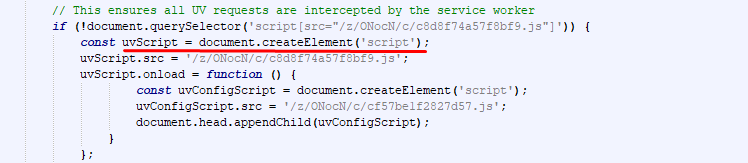
Establishing a transparent proxy via an external library
Stage 3. Session hijacking and browser window spoofing
The final stage unfolded on a third page, combining adversary-in-the-middle (AitM) traffic interception with a browser-in-the-browser (BitB) UI spoofing technique. BitB attacks operate by rendering a block inside a legitimate webpage that visually mimics a native browser pop-up window.
In this case, the script hosted on the attacker’s page generated a pop-up visually identical to a native browser window, complete with window controls and a spoofed address bar showing a trusted Microsoft URL. Within this simulated window, an iframe loaded the authentic login interface, routed dynamically through the service worker reverse proxy created in Stage 2. When the victim entered their credentials and MFA code into the BitB window, the proxy script intercepted both the credentials and the session tokens. Combining BitB with AitM significantly increases the threat: BitB provides a convincing, trusted visual wrapper (displaying a legitimate URL and branding), while the hidden AitM proxy quietly handles traffic interception and session hijacking behind the scenes.
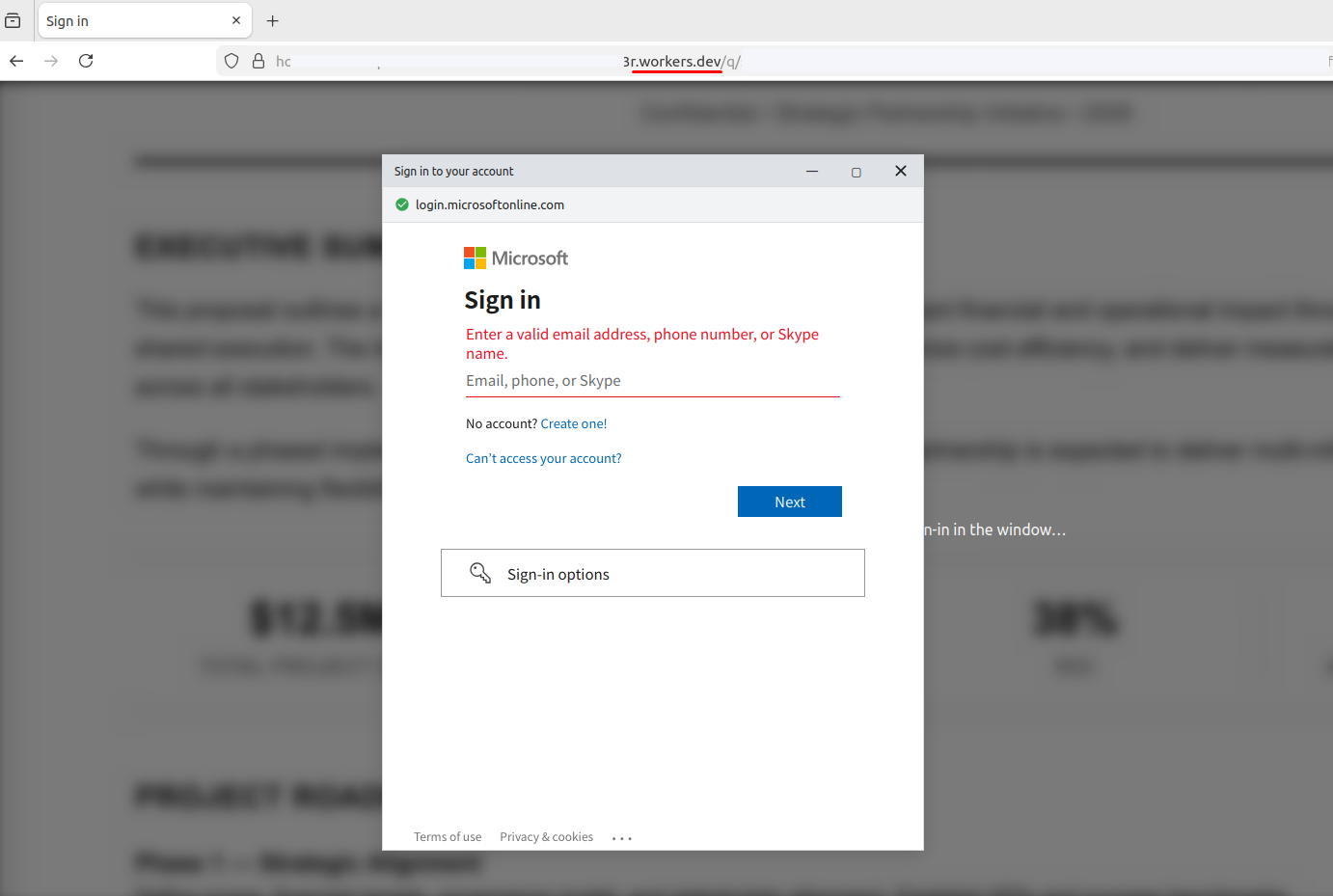
Upon successful login, the proxy instructs the interface to close the pop-up and redirect the victim to a generic system error page, such as SessionExpired. This minimizes suspicion: the victim assumes a technical glitch occurred and attempts to log in again, unaware that the attacker already has full access to the session.
Cloud platform phishing attack statistics
We analyzed phishing URLs hosted across popular cloud platforms – including Cloudflare, Netlify, and GitHub Pages – over a 12-month period spanning August 2025 to July 2026. The data below outlines trends in unique third-level domains exploited to deliver phishing content. In total, our security solutions blocked 224,984 unique third-level domains on cloud and decentralized services used in phishing attacks within that timeframe.
Number of unique third-level domains
(download)
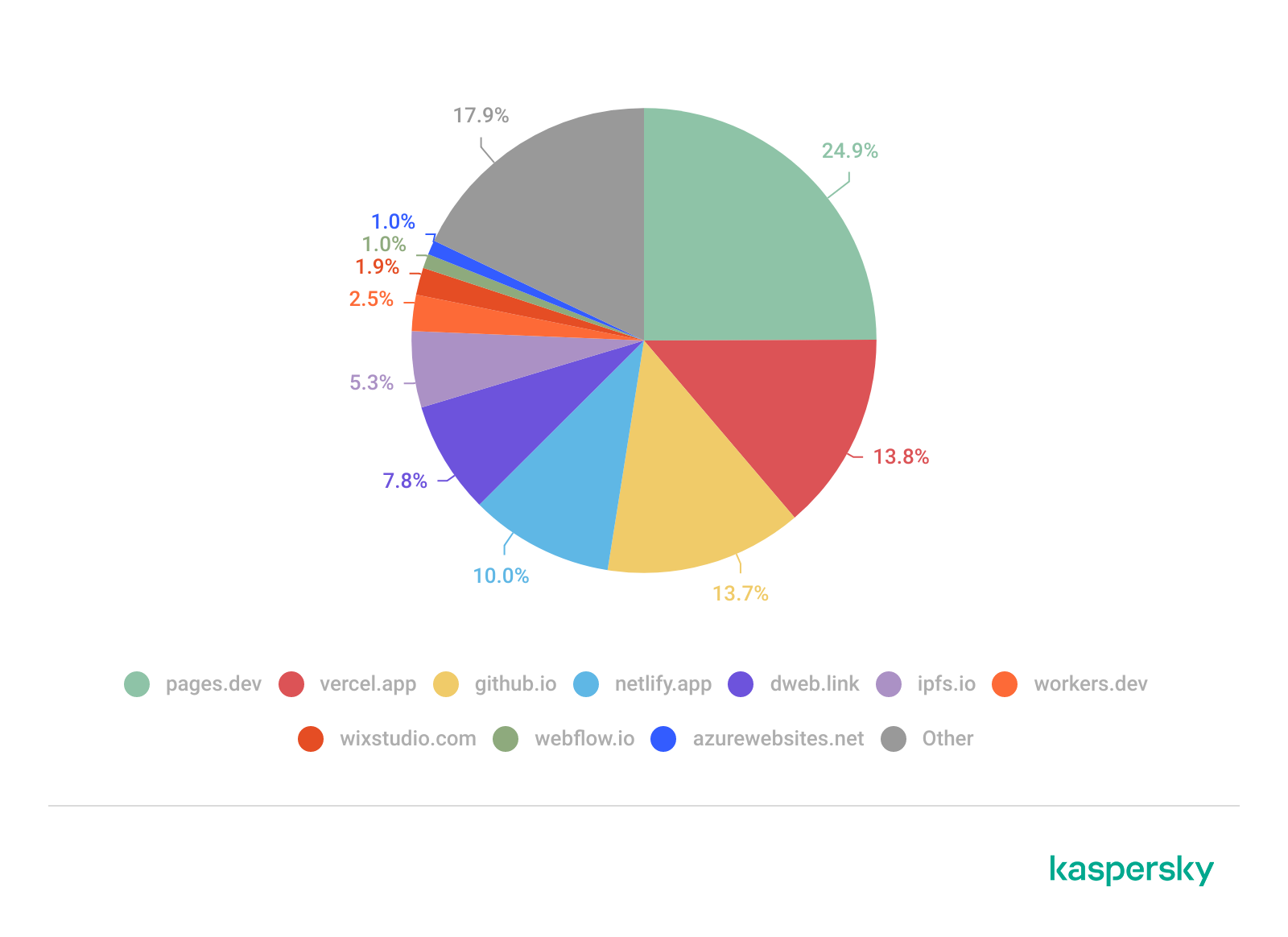
Based on this telemetry, we compiled a list of the TOP 10 cloud domains most frequently abused in phishing campaigns over the specified period.
Number of phishing links
Unsurprisingly, Cloudflare and Vercel emerged as the undisputed leaders: both offer free tiers, automated SSL certificate issuance, and global CDNs. GitHub Pages ranked third. The widespread legitimate use of the github.io domain complicates bulk blocking efforts, as security teams risk limiting access to non-malicious projects.
Decentralized networks also warrant close attention – we posted on this subject in 2023. The ipfs.io and dweb.link domains function as IPFS gateways. The principal risk associated with these platforms is content persistence: even if a specific gateway gets blocked, the phishing page remains accessible via alternative nodes across the network.
The visual website builders Wix and Webflow also ranked among the TOP 10 (eighth and ninth, respectively). These platforms allow low-skilled individuals to build phishing pages rapidly without advanced coding expertise, which significantly lowers the barrier to entry for less capable malicious actors.
| Domain | Number of phishing links | Platform | |
| 1 | pages.dev | 24.9% | Cloudflare Pages |
| 2 | vercel.app | 13.8% | Vercel |
| 3 | github.io | 13.7% | GitHub Pages |
| 4 | netlify.app | 10.0% | Netlify |
| 5 | dweb.link | 7.8% | IPFS gateway |
| 6 | ipfs.io | 5.3% | IPFS (InterPlanetary File System) |
| 7 | workers.dev | 2.5% | Cloudflare Workers |
| 8 | wixstudio.com | 1.9% | Wix Studio |
| 9 | webflow.io | 1.0% | Webflow |
| 10 | azurewebsites.net | 1.0% | Microsoft Azure |
| Other | 17.9% |
In total, we identified and neutralized over 390,000 phishing pages hosted across legitimate cloud platforms and decentralized networks (IPFS) over the past 12 months. This data confirms that threat actors actively exploit the implicit trust associated with legitimate PaaS providers (such as Cloudflare Workers, Vercel, Netlify, and GitHub Pages) and IPFS gateways. High domain reputation, generous free tiers, and built-in evasion capabilities enable phishers to deploy multi-stage AitM attacks designed to hijack MFA sessions.
Recommendations
Traditional security controls, such as relying on HTTPS lock icons or reputation-based domain denylists, are inadequate against these attacks. The cloud provider’s apex domain maintains a positive reputation score, while attackers generate malicious subdomains programmatically and at scale.
Effective defense against these threats calls for a layered security posture:
- Exercise caution with unexpected requests, even if they are served from reputable domains or secured with valid SSL/TLS certificates.
- Treat any CAPTCHA interface requiring personal data input as a possible scam. Legitimate CAPTCHA challenges rarely request personally identifiable information, such as email addresses.
- Inspect the URL in the address bar at the very top of the browser window. In BitB attacks, threat actors can render a fake browser pop-up displaying any target URL, even a legitimate one. However, the true address bar – located at the top of the main browser window alongside native navigation controls (Back, Forward, Refresh) – will continue to display the actual attacker-controlled domain.
- Avoid entering credentials in pop-ups you did not expect to see. If a login or MFA form appears without your explicit action, close the tab immediately. Navigate to the intended service manually by entering its address directly into the browser.
- Additional protection can be provided by Kaspersky Secure Mail Gateway for enterprise environments and Kaspersky Premium for personal correspondence. These robust email security solutions neutralize phishing links at the delivery stage before they reach the inbox.
How legitimate cloud platforms enable phishers to bypass MFA
From the same authors





In the same category














Bob Smith
Good write up and detail.
Would phishing-resistant MFA like passkeys mitigate this?
Securelist
Hi! Yes, because they cryptographically bind authentication to a legitimate domain, preventing a proxy from intercepting the session.
Artem
Passkeys might look like a panacea, but they have disadvantages and pitfalls as well. While software giants are pushing them hard these days, and they are valuable for home users, passkeys are typically stored in a vault bound to a single cloud provider. This introduces extra steps and friction if you try to use them on a different ecosystem. Also, what about corporate users? Typical enterprise network infrastructure relies on strictly regulated standards where backward compatibility is a cornerstone. In a nutshell, if you cannot replace the old authentication standard with passkeys across every single host, you will struggle to implement them at all.
Securelist
Like any security measure, passkeys have their pros and cons. How effective they actually are depends on your infrastructure, budget, and security policies. The article’s main focus was on how cloud platforms are exploited by attackers rather than on comparing authentication methods.