



About the vulnerability
The CVE-2024-2658 vulnerability was discovered in 2024 within the FlexNet Publisher component of the Schneider Electric Floating License Manager. This software handles license management across various Schneider Electric products used for comprehensive industrial automation ranging from PLC programming to centralized control room implementation. Below, we break down how a single flaw can jeopardize an entire industrial facility, how to detect it on your workstations, and how to minimize the risks.
This vulnerability is a CWE-427: Uncontrolled Search Path Element issue. It stems from a system application referencing an OpenSSL configuration file at a hardcoded path without proper access controls.
This behavior allows a local non-administrator to craft a custom OpenSSL configuration file and force the lmadmin.exe system process – the core service that handles licensing – to load a third-party DLL. Consequently, the attacker’s code executes within the context of the service rather than a standard user account. Under specific conditions, this paves the way for further privilege escalation to the NT AUTHORITY\SYSTEM level.
Once NT AUTHORITY\SYSTEM access is achieved, the adversary can gain full control over local configuration files, sensitive system data, and secrets stored on the host. The potential for lateral movement to other nodes in the industrial network – such as engineering workstations – hinges on network connectivity, availability of stored credentials, and overall network architecture. Furthermore, the attacker can disrupt the operation of the license server itself, directly impacting the availability of engineering software and maintenance.
We will examine the role the FlexNet Publisher component plays within the Schneider Electric Floating License Manager (Schneider Electric FLM), why the hardcoded openssl.cnf path inside the application creates a critical hazard, what the exploit chain looks like, and the necessary mitigation steps to secure your environment.
The role of FlexNet Publisher in Schneider Electric FLM
FlexNet Publisher is a third-party commercial product by Flexera Software. The engineers behind Schneider Electric FLM, along with developers of numerous other industry solutions, integrate FlexNet Publisher as a library to manage product licensing. The underlying issue within FlexNet Publisher is that up to and including version 11.19.6.0, the library failed to restrict low-privileged users from modifying or replacing the openssl.cnf file. This is a textbook example of an Uncontrolled Search Path Element vulnerability (CWE-427).
Schneider Electric FLM relies on a combination of tightly integrated components:
lmadmin.exe: a lightweight 32-bit daemon that services license requests coming from PLCs, HMIs, and SCADA modules. During installation, this component is automatically registered as a Windows service named lmadminSchneider. The service is configured to launch automatically and executes under theNT AUTHORITY\LOCAL SERVICEaccount.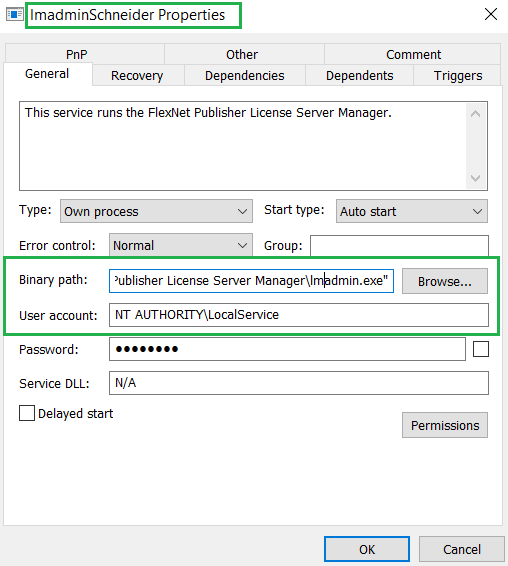
Properties of lmadminSchneider: the executable file and security context of the service
Properties of lmadminSchneider: the executable file and security context of the service
- The
openssl.cnfconfiguration file located in the OpenSSL-contrib subdirectory. This configuration file can specify a path to engine-module, a custom DLL file that FlexNet can automatically load into the lmadmin.exe process space. The application references this configuration file via a hardcoded path built into the binary:1C:\cygwin\home\nightly\LMADMI~1.4\tier1\lmadmin\contrib\openssl\_RELEA~1\openssl\openssl.cnfLMADMI~1.4is the directory name in MS-DOS 8.3 filename format. Any user authorized to create directories in the root ofC:\can recreate this structure – by default, all authenticated users are allowed to do that. A clean, default installation of Schneider Electric FLM does not actually create that folder. - The FlexNet Publisher component (historically known as FLEXlm): the license management library that reads
openssl.cnf, specifically parsing the[engine]section. If a dynamic_path parameter is defined within that section, FlexNet Publisher will load the specified DLL module at the specified path without performing any checks. - The Schneider Electric FLM web portal is a lightweight HTTP server embedded directly within the lmadmin.exe process. It provides access to two main areas: Dashboard (accessible without authentication) and Administration (password-protected). Because the web portal and lmadmin.exe share the same address space, any code loaded via FlexNet Publisher executes directly inside the lmadmin.exe process. This allows an attacker to easily intercept credentials for the Administration portal and leverage them to expand their attack surface across other systems.
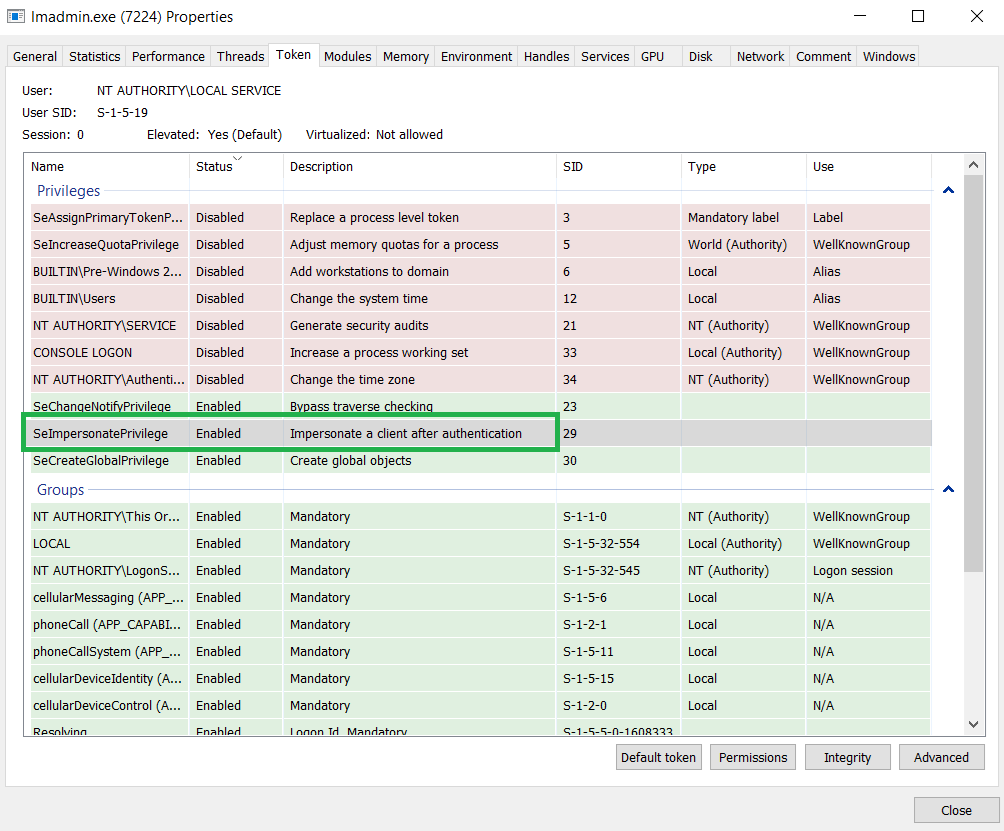
SeImpersonatePrivilege assigned to the lmadmin.exe process
The exploit path
To exploit this vulnerability, the attacker must first have the ability to execute arbitrary code locally on the machine hosting the vulnerable service. The primary weakness exploited here stems from standard Windows NTFS permissions: by default, the root directory of the system drive often allows the Authenticated Users group to create new folders. If these permissions (ACLs) have not been tightened, a non-privileged attacker can manually reconstruct the exact directory structure that lmadmin.exe checks for its OpenSSL configuration:
|
1 |
C:\cygwin\home\nightly\LMADMI~1.4\tier1\lmadmin\contrib\openssl\_RELEA~1\openssl\ |
Next, within this newly created openssl.cnf file, the attacker adds a parameter pointing to a malicious engine module hosted in a writeable directory, for example: dynamic_path = C:\\Users\\public\\malicious.dll. When FlexNet Publisher initializes OpenSSL, it parses this section. Upon finding the dynamic_path parameter, it uses it to load the attacker’s DLL. Because vulnerable versions of FlexNet are allowed to read an OpenSSL configuration from an initially non-existent, untrusted path, the lmadmin.exe process accepts the rogue configuration file as legitimate.
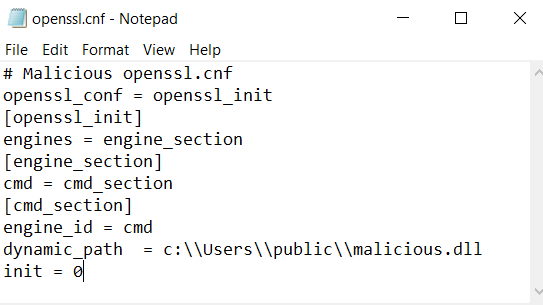
Example of a malicious openssl.cnf configuration file
For lmadmin.exe to parse the openssl.cnf file and execute the malicious DLL, the lmadminSchneider service must be restarted. This can happen under any of the following conditions:
- After a regular reboot of the host machine.
- If the user possesses permissions to restart the service – by default, the Authenticated Users group is not allowed to do that.
Upon lmadmin.exe service startup, FlexNet Publisher initializes OpenSSL, opens the openssl.cnf configuration file, and parses the [engine] section. If a dynamic_path is specified, OpenSSL loads the corresponding DLL module directly into the lmadmin.exe process space. Once loaded, the code within the DLL executes in the context of lmadmin.exe. Because the service runs under NT AUTHORITY\LOCAL SERVICE, the malicious code inherits its privileges.
While the NT AUTHORITY\LOCAL SERVICE account is highly restricted by design, a significant risk for further privilege escalation remains. This exposure exists because, in a standard configuration, the service process is granted SeImpersonatePrivilege. This privilege allows the process to impersonate a client’s security context after authentication. Given an appropriate interaction scenario via RPC, COM, or named pipes, an attacker can exploit this to achieve local privilege escalation to NT AUTHORITY\SYSTEM. This is commonly done with tools from the Potato exploit family or similar impersonation abuse techniques. Consequently, while each individual step may appear unremarkable, their combination forms a complete exploit chain: moving from a low-privileged local user to executing code within a service context, and under the right conditions, to achieving a full escalation to NT AUTHORITY\SYSTEM privileges.
Mitigating CVE-2024-2658
- If your organization does not rely on floating licenses, we recommend completely removing Schneider Electric FLM or avoiding its installation on workstations where it isn’t strictly required. Whenever feasible, use licenses tied to specific machines instead.
- If still required, Schneider Electric FLM should be hosted on a dedicated server with strictly controlled user access.
- Use an administrative account when creating the
C:\cygwindirectory and explicitly deny write permissions to the Authenticated Users group for this folder. This prevents staging a rogue OpenSSL configuration file along the hardcoded path. - Finally, update Schneider Electric FLM to version 3.0.0.0 or later.
Detection with Kaspersky solutions
Kaspersky Industrial CyberSecurity successfully detects exploitation attempts targeting this vulnerability. The KICS Vulnerability Manager module flags the presence of the vulnerable software version on endpoints, while the behavioral analysis engine tracks each stage of the attack chain – from the creation of the rogue configuration file on disk to the vulnerable service’s attempt to load the malicious library.
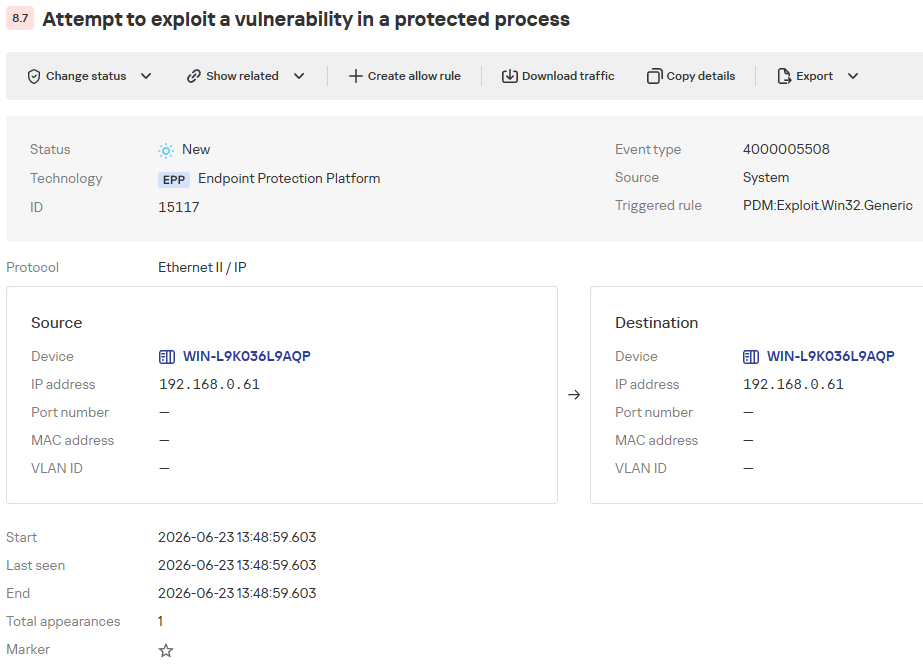
Detecting an exploitation attempt: an overview
The KICS alert card consolidates details on the exploitation attempt alongside recommended defensive actions.
|
1 2 3 4 5 6 7 8 9 10 11 12 13 14 |
Description The Exploit Prevention component of the EPP application detected attempts to exploit a vulnerability in a protected process. This type of attack may lead to malicious code execution, unauthorized access, or system integrity compromise. EPP application data ● Object name: C:\Program Files (x86)\Schneider Electric\Floating License Manager\FLEXnet Publisher License Server Manager\lmadmin.exe. ● Status: Untreatable. ● MD5 hash: c3f57667d9e8e1b2375ba09cdf71cac8. ● SHA256 hash: 9dab845704d1999ec8ed089594cfd2173a08057f1caf9a2346c22c81039dbb7a. Mitigations ● Analyze the event and identify the source of the startup or interaction with the process. ● Make sure that this vulnerability is relevant to your system (check the software version and installed updates). ● If a vulnerability exploit is confirmed, isolate the device and search for signs of compromise (suspicious files and their checksums, unknown processes/services, or queries to external IPs/FQDNs). Also, check for similar traces on other devices. ● Install security updates for the attacked software or operating system and run a full scan of the device if necessary. |
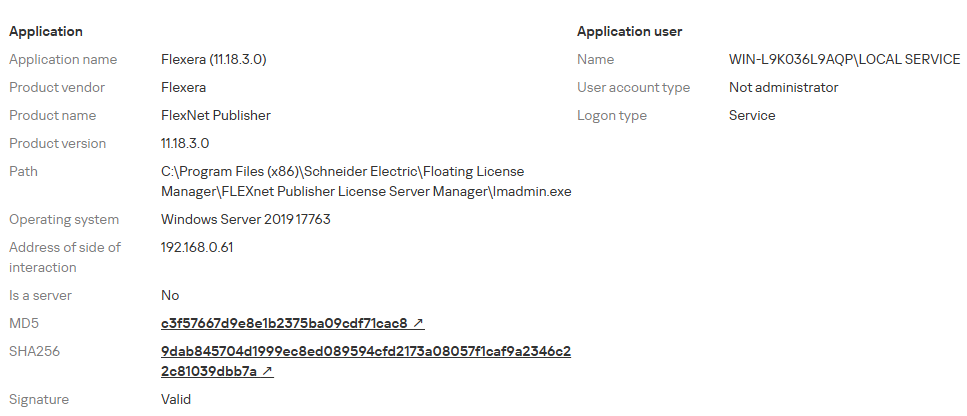
Detecting an exploitation attempt: target process details
Additionally, to proactively identify the presence of the vulnerability on a host as part of a continuous vulnerability management process, organizations can utilize the OVAL scanning task within KICS products. The following screenshot illustrates how KICS for Nodes highlights the presence of the vulnerable software version.
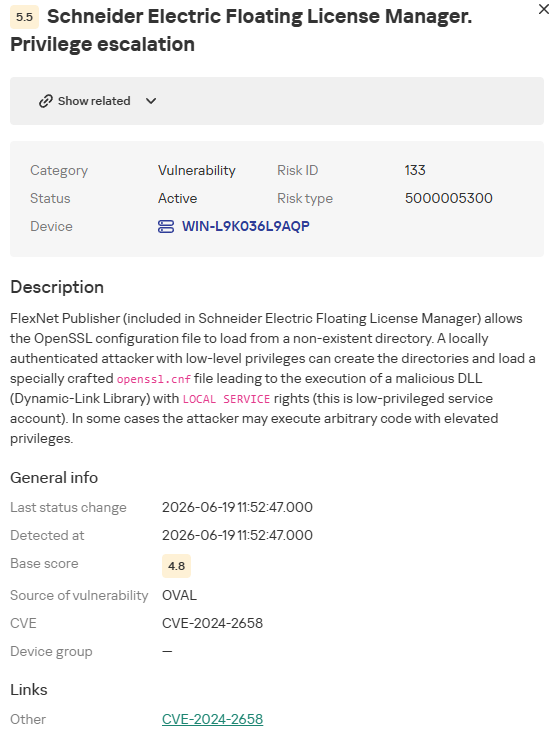
CVE-2024-2658 vulnerability details
Conclusion
The CVE-2024-2658 vulnerability is a prime example of the consequences that dependency-loading mechanisms lacking proper validation can have. In the case of the Schneider Electric Floating License Manager, a local non-administrator can position a rogue openssl.cnf configuration file at the hardcoded path to inject a malicious DLL directly into the lmadmin.exe service context. Given a certain system configuration, this chain can be leveraged to escalate privileges to the NT AUTHORITY\SYSTEM level.
To remediate this vulnerability, organizations must immediately upgrade the affected component (FlexNet Publisher) to a patched version and restrict write permissions for non-privileged users to the C:\cygwin directory. Implementing these controls will significantly reduce exploitation risk, while Kaspersky Industrial CyberSecurity solutions can provide an added layer of defense by detecting anomalous behavior at the earliest stages of the attack.
Authors

Beware of the license manager: how a Schneider Electric software vulnerability puts industrial facilities at risk