

Authors
Our Global Emergency Response Team (GERT) recently investigated an engagement in which an adversary destroyed an organization’s virtualization estate over a 10-day period. The campaign targeted four ESXi hosts, every virtual machine hosted on them, both vCenter Server Appliances, and all connected backup infrastructure. The ransom notes identified the attacker as the BlackNevas group, first observed in November 2024. What’s interesting about this attack is that no virtualization layer vulnerabilities were exploited: no guest-to-host escapes, no hypervisor memory corruption. Every action taken against ESXi was executed through legitimate VMware management interfaces.
In September 2021, the Babuk ransomware source code was leaked online, including its ESXi version, which made ESXi ransomware accessible to cybercriminals with relatively low technical skills. At least ten subsequent ransomware families have leveraged this leaked code, including groups that otherwise lacked the expertise to develop ESXi-compatible ransomware lockers from scratch. We saw multiple operators using Babuk-derived ESXi lockers along with the leaked LockBit Windows builds. It is worth noting that while the Babuk ESXi version may target both old and up-to-date systems, the target organizations run unsupported ESXi versions, making them easier to attack.
This article examines why the hypervisor layer remains difficult to monitor, what common access paths adversaries use to reach it, and how they establish persistence on the management plane. We’ll also look into the architecture of ESXi encryptors, the deliberate destruction of backup infrastructure, and the log sources that enable post-incident reconstruction. At the end of this article, we’ll provide indicators of compromise recovered during the investigation.
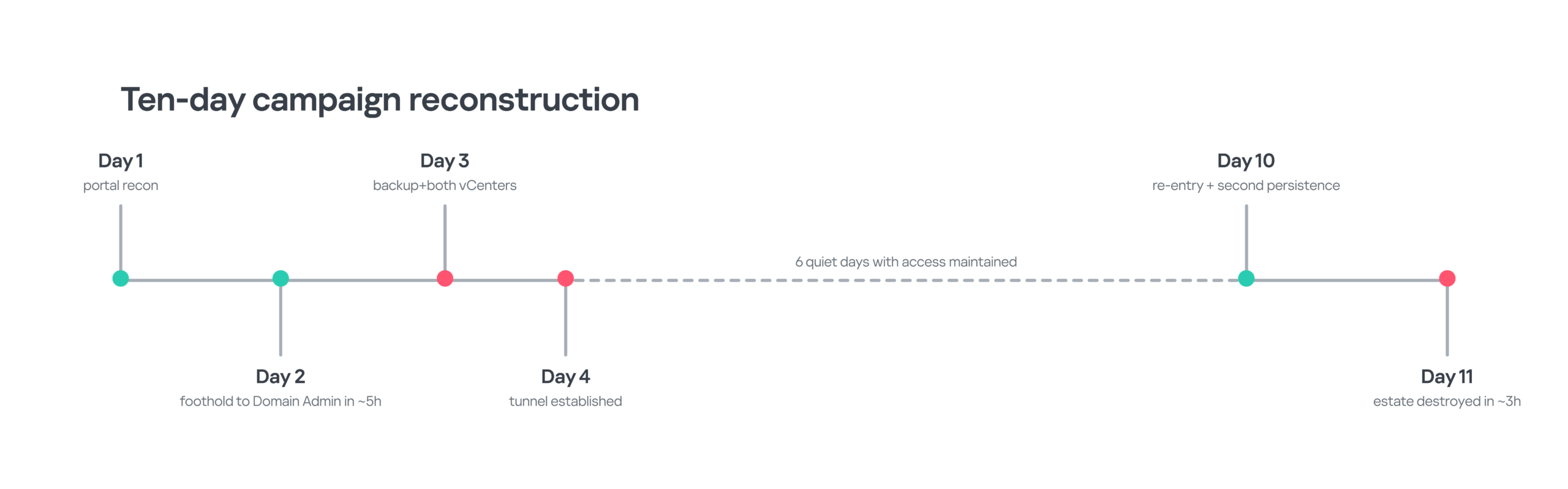
Ten days of dwell time from initial access to the destructive phase. Timeline reconstructed from incident evidence
Why the hypervisor changes ransomware economics
Virtualization enables cost-effective and efficient resource management, simplifies simultaneous updates and policy enforcement. However, at the same time it reduces the number of control points and enables broader impact in case of a cyberattack. In non-virtualized environments, a single guest compromise normally affects one operating system. Compromise of the virtualization management plane gives the attacker access to many hypervisor hosts, while direct impact on an ESXi datastore can render many guest systems unavailable at once. This makes the hypervisor layer an attractive target for ransomware operators, especially when domain controllers, application servers, databases, and backup workloads share the same virtualized estate.
According to Kaspersky’s global cybersecurity services report, ransomware accounted for 39.4% of incidents GERT handled in 2025, and the data for the beginning of 2026 shows that it remains a major threat. Back in 2023, SentinelOne documented that multiple ransomware families are using ESXi lockers derived from the leaked Babuk source code, which lowered the development barrier for actors who otherwise lacked the necessary expertise to build ESXi-capable samples. This makes ransomware targeting virtualization environments more accessible to a broader range of threat actors, and this trend is still with us.
The visibility asymmetry
ESXi is a specialized hypervisor based on VMware’s proprietary VMkernel. It shares certain similarities with Linux (and other Unix-like systems), accepts Linux commands and runs certain Linux-like software, but it is different from general-purpose Linux distributions. Broadcom states that off-the-shelf security tools designed for general-purpose operating systems cannot run on ESXi without workarounds and that direct installation of third-party agents or antiviruses on ESXi and vCenter Server Appliance (VCSA) is not supported. Defenders therefore rely heavily on built-in hardening, management-plane telemetry, agentless security solution integrations, and telemetry collection from the infrastructure outside ESXi hosts.
Guest operating systems are usually protected by EDR software, but if an ESXi-side process modifies a virtual machine disk (VMDK) or related datastore file, an EDR agent inside a guest cannot directly observe or attribute the hypervisor process performing the operation. Guest telemetry may record consequences, such as I/O failures or an abrupt shutdown, but the malicious execution occurs outside its boundary. In the engagement examined here, this made host-native and management-plane telemetry central to the incident timeline reconstruction.
How attackers reach the virtualization layer
There are different routes into the environment that require different controls, but can ultimately provide access to the centralized virtualization management plane and the ESXi hosts it controls. In this article, we’ll look into four main routes that may lead to virtualization infrastructure compromise:
- Vulnerability exploitation
- Credential reuse from the Windows estate
- Active Directory integration abuse
- Backup infrastructure as a credential bridge
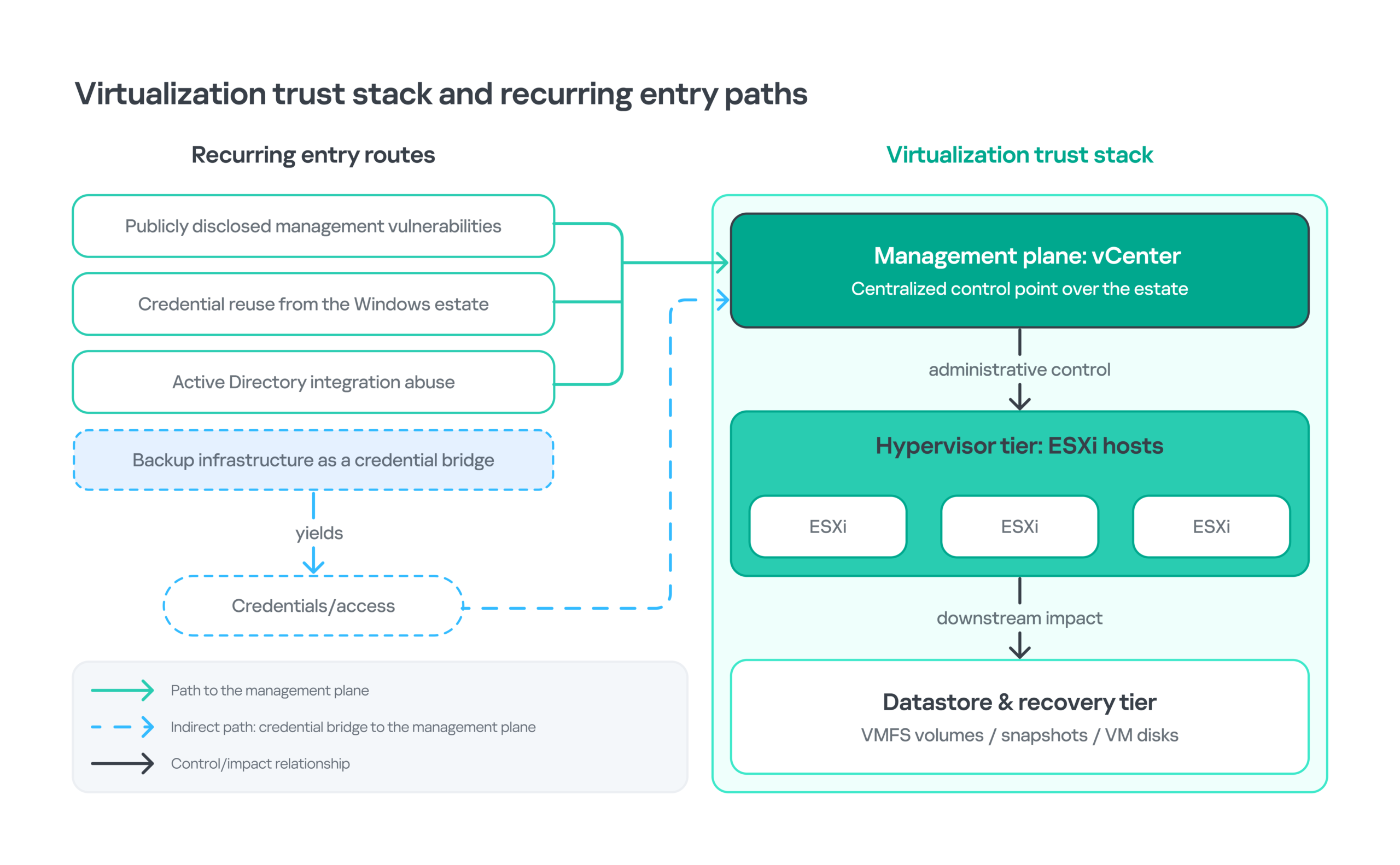
The virtualization trust stack and recurring entry paths
Vulnerability exploitation
In the incident we analyzed, there was no evidence pointing to an ESXi vulnerability as the initial access path. Nevertheless, public vulnerabilities remain important because they have been used to compromise the virtualization management infrastructure. With the exploits available online, this is one of the most probable entry routes. Below you can find several examples of vulnerabilities affecting virtualization environments that have been seen exploited by the attackers. For example, the Twelve group chained CVE-2021-21972 and CVE-2021-22005 to plant a web shell directly on a vCenter appliance, which loaded a backdoor that then established persistence by injecting a shared object into the SSH daemon. Note that these vulnerabilities are not related to the incident in question and they are provided merely as an initial access vector illustration, which could help defenders define their relevant attack surface and prioritize patching activities.
| CVE | Layer | Security effect | KEV* | Why it matters here |
| CVE-2021-21974 | ESXi OpenSLP | Remote code execution in vulnerable OpenSLP service | No | Historically associated with discussion around the ESXiArgs ransomware. |
| CVE-2021-22005 | vCenter Server | Arbitrary file upload leading to remote code execution | Yes | Documented use in ransomware-related activity. |
| CVE-2021-21972 | vCenter plugin | Unauthenticated RCE via vSphere Client plugin | Yes | Documented use in ransomware-related activity. |
| CVE-2021-21985 | vCenter VSAN Health Check plugin | Remote code execution | Yes | Documented use in ransomware-related activity. |
| CVE-2023-34048 | vCenter DCERPC | Out-of-bounds write leading to RCE | Yes | Known exploited vulnerability affecting vCenter. Although there’s no data about its involvement in ransomware incidents, it is worth noting due to its impact on the virtualization management plane. |
| CVE-2024-37085 | ESXi AD integration | AD permissions can become full ESXi administration | Yes | Documented use in ransomware-related activity. It also highlights the risks arising from the relationship between AD identities and administrative access to ESXi. |
| CVE-2024-38812 / 38813 | vCenter DCERPC | RCE / privilege escalation to root | Yes | Known exploited vulnerabilities affecting vCenter. Although there’s no data about their involvement in ransomware incidents, they are worth noting due to their impact on the virtualization management plane. |
| CVE-2025-22224 / 22225 / 22226 | ESXi / Workstation / Fusion | Guest-to-host chain requiring prior guest privileges | Yes | Known exploited vulnerabilities allowing attackers to perform a guest-to-host attack chain. CVE-2025-22225 exploitation has been seen in ransomware incidents. However, this attack chain requires privileged access to a guest VM, which makes it less critical than unauthenticated RCEs. |
* Known Exploited Vulnerabilities database maintained by CISA. KEV status indicates that exploitation of a vulnerability has been observed in the wild, but does not by itself indicate ransomware use. Where ransomware use is documented, it is stated separately. Neither KEV status nor known exploitation by ransomware actors means that the vulnerability was used in the incident in question.
Active Directory integration
CVE-2024-37085 is a useful illustration of why it is crucial to authenticate to different systems separately even when the hypervisor itself is patched. The vulnerability affects ESXi hosts configured to use AD for user management. According to Microsoft, it is exploited by ransomware operators, including Akira and Black Basta, abusing the ESX Admins group behavior to obtain full ESXi administration. CISA lists the issue in their KEV catalog and notes that it has been used in ransomware incidents.
The vulnerability is fixed in ESXi 8.0 U3. For older systems, Broadcom recommends the following workaround:
- Change the
esxAdminsGroupAutoAddvalue fromtruetofalse. - Change
authValidateIntervalfrom 1440 to 90 minutes. - Clear the default ESX Admins group mapping where appropriate.
These controls reduce exposure, but the architectural lesson is broader: domain compromise should not automatically allow the adversary to obtain hypervisor admin rights.
Recommendation for defenders
Avoid unnecessary direct Active Directory dependency on ESXi hosts. Where business requirements demand it, stick to the principle of least privilege: add only those accounts to administrative groups that really need this level of access, use separate admin accounts with separate credentials for the domain and for hypervisors, restrict access to the ESXi and vCenter management interfaces to only those network segments, accounts and workstations that are necessary to control it, and continuously validate ESXi permission changes. vCenter role-based access control (RBAC) and identity federation should be configured for virtualization administration, while ordinary enterprise credentials and broad domain groups should not be used to access vCenter or ESXi with high privileges.
Credential reuse from the Windows estate
The third path requires no vulnerability. Administrative credentials present on domain controllers, jump servers, backup systems, identity infrastructure or administrator workstations may provide access to vCenter or ESXi if the same admin accounts are used across different infrastructure segments. MITRE ATT&CK treats the Valid Accounts technique as applicable to ESXi and specifically notes that compromised default or domain accounts can provide privileged access to other systems.
In this incident , credentials obtained from non-virtualization systems inside the organization’s perimeter were used to reach the vCenter Server Appliances. Unlike vulnerability exploitation, successful authentication with a valid account may appear operationally normal. To reliably detect such activity, analysts must therefore evaluate the source host, account history, time, destination, subsequent administrative actions, and whether the authenticated account normally manages virtualization infrastructure.
Backup infrastructure as a credential bridge
Backup platforms are not passive storage. They commonly require service accounts, hypervisor credentials, repository access and broad network reach so they can protect and restore critical workloads. This makes the backup server a concentrated trust point. In this incident, the adversary extracted stored credentials after gaining administrative execution on backup infrastructure, creating a route toward other infrastructure tiers.
Persistence on the management plane
With the potential risk possibilities explained, let’s go back to our case study. The attackers managed to compromise via SSH the vCenter appliance managing virtualization disaster recovery where they established two layers of persistence. The first used MeshAgent, the endpoint component of the legitimate MeshCentral remote management platform. The second used Ligolo-ng as a reverse tunnel implemented as a systemd service. This activity maps to two ATT&CK techniques: Systemd Service (T1543.002) and Protocol Tunneling (T1572).
The timeline was as follows. The attackers authenticated on the appliance as root via SSH. Forty-three seconds later, they fetched and deployed MeshAgent through a shell script. The SSH session lasted 2 minutes and 26 seconds in total. After it ended, the adversary didn’t use SSH to access the compromised appliance anymore, thus reducing the usefulness of monitoring focused only on interactive SSH sessions. Roughly four hours later, they returned through MeshAgent and installed the Ligolo-ng tunnel as a persistent systemd unit.
|
1 2 3 4 5 6 7 8 9 |
Unit file /etc/systemd/system/vmware-vdma.service Service vmware-vdma Description "DNS, time, VM settings sync (v2.03.24766)" ExecStart /opt/vmware/bin/agent Restart always Strings in /opt/vmware/bin/agent: Ligolo-ng v0.8.2 api.cloudvflare[.]com:443 |
The unit uses a VMware-like prefix, places its binary under /opt/vmware/bin/, describes plausible appliance housekeeping functions, and requests Restart=always. A defender should not treat any unrecognized VMware-looking service as malicious by default, because custom integrations may exist, but a service absent from the list of services the organization defines as trusted is a high-confidence anomaly requiring immediate validation.
Beyond the incident in question, more advanced ESXi persistence techniques have also been documented. For example, Mandiant observed attackers using malicious vSphere Installation Bundles (VIBs) as a persistence mechanism on compromised ESXi hosts. This demonstrates that attackers with administrative access can establish persistent access at the hypervisor layer, including persistence that survives host restarts. However, this incident shows that common remote-management software and a systemd service can be sufficient when vCenter itself is trusted and poorly monitored.
Turning vCenter into an offensive control plane
One interesting technique observed in the incident was the use of vCenter Host Profiles. Host Profiles are intended to capture and enforce configuration across ESXi hosts. A Host Profile can be applied to separate hosts, clusters of hosts or all hosts associated with a profile. It also may contain subprofiles covering specific configuration aspects, e.g., authentication. Among other things, Host Profiles may contain configuration for Tech Support Mode (TSM) and TSM-SSH.
In this incident, the adversary used Host Profiles to change TSM-SSH service state to enable SSH on target ESXi hosts. The evidence recorded the following sequence:
| Offset | Source | Observed event | Primary evidence |
| T+0 | vCenter | Host configuration read through Host Profile workflow | vpxa.log |
| T+10m18s | vCenter | Configuration change pushed to enable SSH | vpxa.log |
| T+10m51s | vCenter / ESXi | TSM-SSH service reached RUNNING state, indicating that SSH has been enabled on the host and it is accessible from a remote device |
vpxa.log + vobd.log |
Note that the 33-second interval between the configuration push and TSM-SSH reaching RUNNING state is short enough for us to be able to quickly correlate these events by comparing logs from different sources. Overall, it took the attacker eleven minutes after the initial configuration read to reconfigure the host from policy-disabled SSH to direct remote access support. Subsequently, direct SSH access to the target ESXi hosts originated from the vCenter appliance IP, a source that would normally be considered highly trusted on the management network.
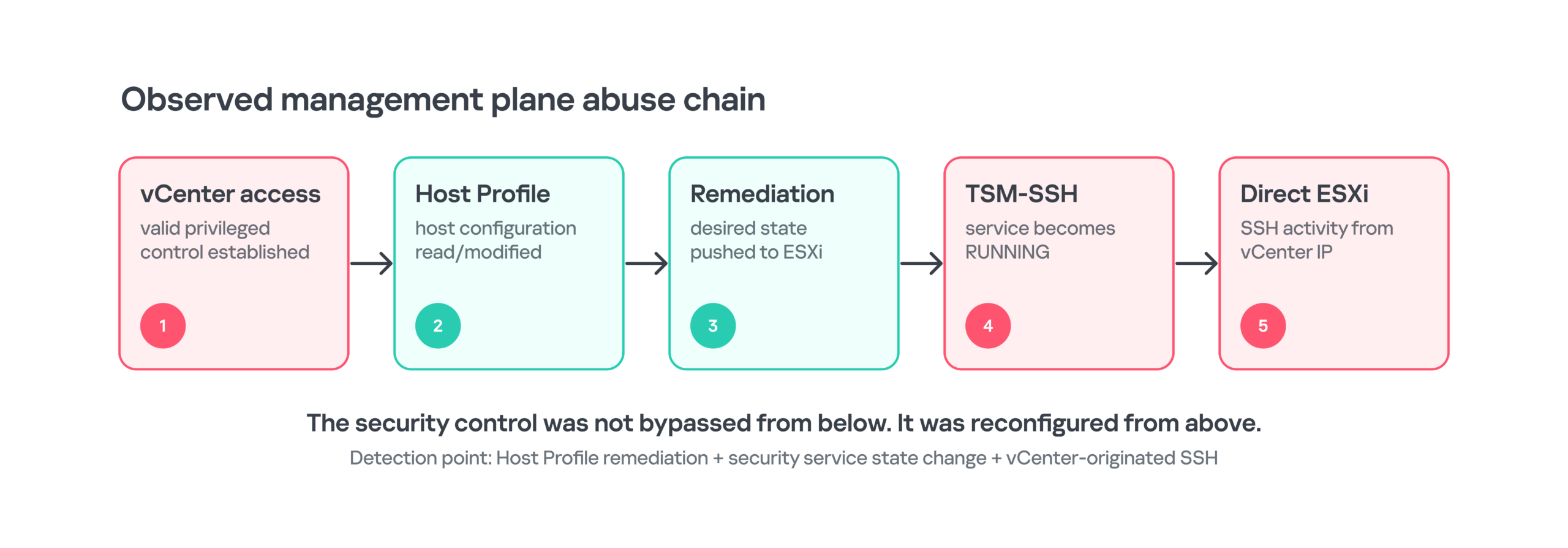
Compromise of the management plane converted a legitimate compliance mechanism into an access path to the managed hypervisor
Why ESXi configuration change via vCenter is a trust-boundary failure
Host hardening is important, but centrally administered controls should not be considered independent once the central management tool is compromised. If vCenter has authority to modify host state, an attacker controlling it may be able to make a malicious change look structurally similar to legitimate compliance activity: read configuration, apply a desired state, and observe the result. The distinguishing context becomes authorization, the timing, the source account, the change window, and whether the desired state itself weakens security.
This is why vCenter should be treated as a Tier 0 asset and provided with the highest possible level of protection. Management-plane administrative accounts should be isolated from ordinary enterprise administration, network access should be restricted to dedicated management paths, high-risk configuration changes should require strong authentication and monitoring, and vCenter-to-ESXi traffic should be thoroughly compared to a normal behavior baseline (connection patterns, ports, protocols, source and destination systems) rather than implicitly trusted. All significant discrepancies should be treated as suspicious and investigated.
High-fidelity detection opportunity
An alert should be generated when Host Profile compliance (or remediation in VMware terms) changes TSM or TSM-SSH configuration outside an approved window, particularly when followed by a new SSH session from vCenter or another management appliance. This sequence is more precise than alerting on SSH alone because each step is legitimate in isolation but dangerous in combination.
Notes on ESXi abuse: living-off-the-land tools and controls to monitor
Once an attacker can administer ESXi, many destructive actions require no exploit. LOLESXi project catalogs native ESXi binaries and scripts that have been abused by threat actors, including administrative utilities that enumerate VMs, control power state and alter configuration. This mirrors living-off-the-land behavior on Windows, but the target is the hypervisor control plane.
There are two ESXi hardening mechanisms, and changes to either can be viewed as highly suspicious. Host acceptance level controls which VIBs are allowed to install. The execInstalledOnly setting controls whether non-installed binaries may execute. Broadcom states that ESXi 8 enables the execInstalledOnly runtime option by default and warns that disabling it allows unknown non-installed binaries to execute, increasing ransomware risk. There is also a kernel enforcement setting with the same name, which is related to the runtime option, but distinct. Changes to that may require a reboot.
| Control | What it governs | Why a change is suspicious | Useful evidence |
| Host acceptance level | Which VIB packages can be installed | Lowering to a less trusted level expands what the host will accept | esxcli / config events / esxupdate.log |
execInstalledOnly runtime |
Execution of binaries not installed through VIB packages | Value 0/FALSE permits non-installed code to run |
vobd.log + advanced settings |
execInstalledOnly kernel enforcement |
Stronger VMkernel boot-level enforcement that restricts execution to files that were installed through VIB packages and were not subsequently modified. | Weakening may require a reboot and changes the security baseline | kernel settings + boot history |
Inside the ESXi impact phase
Stopping virtual machines before impact
Mature ESXi lockers generally stop guest machines before modifying virtual-disk data because running VMs hold active state and file locks. Different families implement this in different ways, which creates useful behavioral detections. The families described below are not related to the incident in question, but these descriptions may be useful for ransomware protection in general.
| Ransomware family | Observed or documented VM stop approach |
| GwisinLocker, LockBit, Conti | Enumerate worlds with a esxcli vm process list command and terminate individual worlds with a esxcli vm process kill command. |
| AvosLocker, RedAlert (aka N13V) | Use a single shell pipeline for both world enumeration and force kills. |
| Hive, fcker.py | Use vim-cmd vmsvc/power.off for registered virtual machines. |
| RansomHub ESXi builds | Contain custom C++ logic that can enumerate and stop machines without relying on an esxcli or vim-cmd command sequence. |
We don’t know the exact technique used to kill VMs in this incident. However, a rapid sequence of power-off or world-kill operations across many VMs is always a high-confidence pre-impact signal. In the case evidence, the disaster-recovery host showed all VMs stopping within 23 seconds, while vmksummary.log, which stores the number of running VMs each hour, showed it dropping from normal VM counts to zero.
Payload delivery and FlowSsh behavior
The payload was delivered to ESXi via SFTP. The auth.log authentication log file exposed a client identifier associated with FlowSsh, Bitvise’s SSH client library for C, C++ and .NET. FlowSsh supports SFTP, remote execution requests, interactive shell sessions and tunneling. Those capabilities fit the observed delivery model, but the library identification should rest primarily on the recorded client identifier rather than on behavioral inference alone.
After the payload was delivered, the following series of commands was executed. We reconstructed this sequence primarily from the shell.log file.
| Offset | Observed command | Analytical note |
| T+0 | true | No-op probe in a dedicated session. |
| T+1s | chmod +x /tmp/esx64 | Separate execution session. |
| T+1m48s | true | Second no-op probe. |
| T+1m49s | ./tmp/esx64 /selftest | Separate execution session; payload validation stage. |
Each command pair was preceded by a session executing only true. This repeating pattern is consistent with automated FlowSsh channel setup, but in isolation, it can’t be considered a reliable indicator of the tool in use. Human operators could have typed true as well, and other automation frameworks could have emitted reachability probes. The sequence should therefore be hunted as a behavioral fingerprint, not treated as a unique signature for FlowSsh. Its value increases when combined with an unusual SSH client identifier, SFTP staging to /tmp, chmod, and a subsequent self-test or payload execution.
The three-hour self-test window
The /selftest execution ran for approximately 16 seconds and occurred roughly three hours before final detonation. A pre-impact test run may suggest that the operator was validating compatibility with the target ESXi build before proceeding to destructive execution.
Pre-impact detection opportunity
Treat unexpected executable staging under /tmp, followed by execution and subsequent access to /vmfs, as a critical pre-impact sequence. While individual indicators such as chmod +x may be ambiguous in isolation, unexpected execution of a newly staged executable from /tmp can itself be a strong indicator of malicious activity. The complete sequence provides stronger contextual evidence by linking payload staging, execution, validation, and subsequent access to the VM storage layer.
Detonation command and evidence confidence
The attackers executed the following command to trigger the destructive activity.
|
1 |
./tmp/esx64 /p /vmfs/ /depth 5 /wipe /allsys /detach /-showvolumes |
Let’s break it down into separate parameters and analyze their forensic usefulness. Parameter interpretation is accompanied by confidence level, because exact implementation details cannot be reconstructed without the binary.
| Parameter | Observed or corroborated meaning | Interpretation confidence |
| /p /vmfs/ | Target path is the VMFS root where virtual-machine files reside. | High: direct command + platform path. |
| /depth 5 | Directory recursion depth. | High: conventional argument meaning and observed placement. |
| /wipe | Overwrite/wipe behavior; ._wipe artifacts were present across datastores. | High for destructive behavior, medium for exact implementation. |
| /allsys | Include system files. This aligns with publicly documented BlackNevas/Trigona family behavior. | Medium: the assessment is based on the comparison with the publicly documented malware family behavior; missing binary prevents direct validation. |
| /detach | Detach from the terminal; activity continued after SSH disconnect. | High: external documentation + incident persistence of effects. |
| /-showvolumes | Suppress volume listing according to documented family parameters. | Medium: comparative documentation only. |
The forward-slash argument style resembles the Trigona and BlackNevas command-line family. SentinelOne describes BlackNevas as a Trigona derivative with ESXi-capable builds and specialized switches, including /p or /path, /wipe, /depth, and /detach. That comparison strengthens attribution but does not replace a binary hash or reverse-engineered match.
Partial overwrite and what 2 KB actually implies
Incident artifacts indicated that approximately the first 2 KB of virtual disk files were overwritten. Damage to the beginning of a disk can destroy the protective MBR, primary GPT header, and other early boot or filesystem structures, which can immediately make a guest unbootable. However, the UEFI specification requires GPT media to keep both primary and backup GPT headers and partition-entry arrays in different locations. If the primary GPT is corrupt and the backup is valid, GPT-aware software should use the backup, which may help restore the primary. Therefore, an overwrite of the first 2 KB does not by itself mean that the partition metadata is unrecoverable. Practical recovery depends on whether additional boot records, filesystem metadata, volume structures, descriptors, or application data were also modified, and on the exact virtual-disk layout.
Destroying the recovery path first
In this incident, backup infrastructure was not collateral damage. The attacker disabled antivirus protection on the backup environment days before the main attack, and later stopped backup services, encrypted the recovery infrastructure, and disrupted administrative access — all before ESXi detonation. The order of operations reduced the defenders’ ability to restore production when they needed it most.
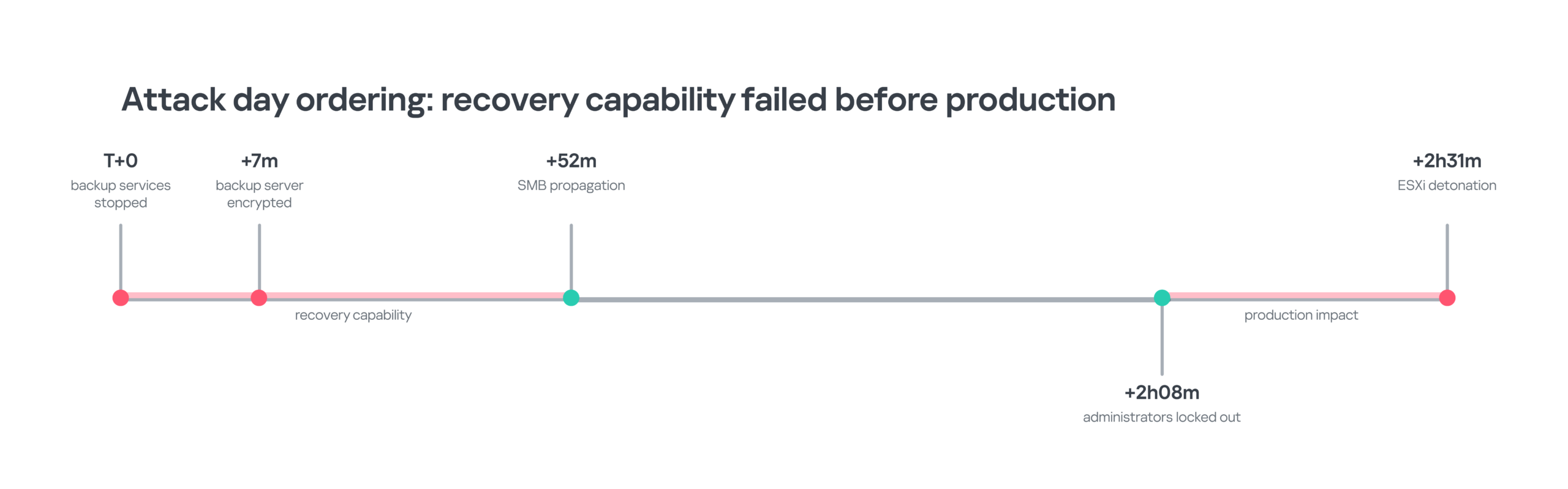
Recovery capabilities were disrupted before the final ESXi impact. The relative timings are based on the incident sequence
This changes the definition of a resilient backup architecture. Storage immutability is valuable, but it does not protect the identities, management servers, repositories, network paths, credentials, or procedures required to perform system restoration. Recovery should be designed as a separate security boundary with independent administrative identities, restricted management paths, offline or logically isolated recovery options, tested restore procedures, and monitoring that does not depend on the production control plane.
Two recent vulnerabilities in Veeam are a perfect illustration of this. Although neither of these vulnerabilities was seen exploited in this case, they take advantage of weak privilege management policy, which may make them exploitable by any domain user, including those with the lowest privileges. CVE-2024-40711 is listed in CISA’s KEV database as a vulnerability exploited by ransomware. CVE-2025-23120 is more recent and still absent from KEV, but it is worth noting that according to Veeam, it allows RCE, but only affects domain-joined backup servers. The general lesson is not vendor-specific: a recovery system that depends on the same identity plane as production infrastructure can be compromised and used to achieve the attackers’ goals.
Detection and investigation
There are a number of log files that document ESXi events. These sources can reconstruct a destructive hypervisor incident even when no endpoint agent exists on ESXi. The limitation is retention. Broadcom states that ESXi logs internally to a ramdisk, which has limited space and gets cleared at reboot, and that persistent scratch or remote syslog is required if logs must survive reboot and local storage loss. We recommend collecting logs to remote storage to maintain forensic visibility into ESXi incidents.
| Priority | Source | What it establishes | Loss risk | Acquisition note |
| P1 | auth.log | SSH authentication, source, session timing, and client identifiers | Medium | Forward remotely; preserve before rotation. |
| P1 | shell.log | Every ESXi Shell command, plus shell enablement and disablement | Medium | Highest-value command source. |
| P1 | vpxa.log | Host-side vCenter actions, including management workflows | Medium | Correlate with vCenter Events and Tasks. |
| P1 | vobd.log | Service-state changes, security observations, and execInstalledOnly events |
Medium | Useful high-signal configuration evidence. |
| P1 | vCenter Events / Tasks | Principal, object and administrative action | Medium | Export immediately if vCenter remains available. |
| P1 | VCSA systemd + filesystem | Persistence units and referenced binaries | Medium | For /etc/systemd/system and /opt/vmware, validate the current filesystem and service configuration against the organization’s approved state |
| P2 | vmkernel.log / vmkwarning.log | Storage, world lifecycle, and kernel warnings | Medium | Corroborates impact and host behavior. |
| P2 | vmksummary.log | Hourly running-VM count and host heartbeat | Medium | Strong for impact scale; coarse timing. |
| P2 | esxupdate.log | VIB / patch installation activity | Medium | Critical if malicious VIB installation is suspected. |
| P2 | vmware.log per VM | VM-specific power and device events | Medium | At risk if the datastore is encrypted or wiped. |
| P2 | hostprofiletrace.log | Host Profile application / compliance activity | Medium | Preserve for suspected Host Profile abuse. |
| P3 | fdm.log / vmauthd.log / syslog.log | HA, port 902 and general daemon context | Medium | Useful corroboration after P1/P2 acquisition. |
High-confidence detection opportunities
This section provides a summary of the most valuable behavioral detection notes derived from the incident. The strongest rules correlate legitimate actions into an abnormal sequence rather than alerting on any one administration command.
| Detection | Behavior | Telemetry | Severity |
| Host Profile -> TSM-SSH | Host Profile remediation changes TSM-SSH from policy-disabled to running outside an approved change window. | vCenter Events, vpxa.log, vobd.log | Critical |
| vCenter-originated direct SSH | New SSH session from vCenter to ESXi after a security-state change. | auth.log + network flow | Critical |
| New VMware-looking systemd unit | New/modified unit in /etc/systemd/system referencing a non-baselined binary under a VMware-like path. |
VCSA filesystem / audit | High |
execInstalledOnly weakened |
/User/execInstalledOnly becomes 0/FALSE or kernel enforcement is disabled. |
vobd.log + config audit | Critical |
| Acceptance level lowered | Host acceptance level is changed to a less trusted level outside maintenance. | vCenter / ESXi config | High |
| Automated SSH probe sequence | true-only session followed seconds later by exec or chmod from the same source/client. |
auth.log + shell.log | High when combined |
| Payload validation | Executable under /tmp performs a short self-test and later touches /vmfs. |
shell.log | Critical |
| Mass VM termination | Many VM power-off or world-kill actions within seconds/minutes. | shell.log, hostd.log, vCenter Tasks | Critical |
| Backup-first impact | Backup services stop or security controls are disabled shortly before hypervisor changes. | Windows/backup telemetry + vCenter | Critical |
| Datastore wipe artifacts | Rapid creation of wipe markers or destructive writes across multiple VMFS volumes. | filesystem + vobd/vmkernel | Critical |
Example correlation logic
Below, we provide two examples of technology-neutral correlation logic that could be used to hunt for similar incidents. Note that they are not ready-made SIEM rules, but you can use them to develop your own rules.
Example 1: Host Profile abuse leading to direct ESXi access:
|
1 2 3 4 5 6 7 8 9 |
IF host_profile_remediation changes service in {TSM, TSM-SSH} AND service_state becomes <code>RUNNING</code> within 5 minutes AND no approved change window exists THEN raise HIGH severity; IF SSH session to same ESXi host originates from vCenter or management appliance within 15 minutes of the remediation THEN escalate to CRITICAL and preserve auth.log, vpxa.log, vobd.log, vCenter Events/Tasks and Host Profile state. |
Example 2: pre-impact ESXi payload staging:
|
1 2 3 4 5 6 7 8 9 |
IF SFTP upload or new executable appears under /tmp AND chmod / execution follows from same SSH client or source AND a short validation run occurs before access to /vmfs THEN raise CRITICAL; Increase confidence if: - client identifier is unusual for the management segment - repeated true-only SSH channels precede commands - multiple VMs are stopped soon afterward. |
Incident response at the virtualization layer
This section contains recommended actions when responding to an incident involving ESXi ransomware.
First 30 minutes after incident discovery
- Isolate vCenter management access from ordinary enterprise segments while preserving investigator access through a controlled path.
- Export vCenter Events and Tasks, SSO audit records, active sessions, and the current Host Profile definitions before remediation changes erase context.
- Collect ESXi auth.log, shell.log, vpxa.log, vobd.log, hostd.log, vmkernel.log, vmkwarning.log, vmksummary.log, esxupdate.log, and hostprofiletrace.log from each affected host.
- Preserve VCSA
/etc/systemd/system,/opt/vmwarepaths referenced by previously unknown or unapproved units, shell history, wtmp, authentication logs, and copies or hashes of suspicious binaries. - Capture backup-server telemetry, service state, credential-store evidence, and network logs before rebuilding or rotating infrastructure credentials.
- Record current
execInstalledOnlystate, host acceptance level, SSH/ESXi Shell state, Lockdown Mode, domain membership, and ESXi permission mappings.
Do not begin by rebooting ESXi merely to remove the attacker session. ESXi logging persistence depends on scratch and syslog configuration, and a reboot may destroy ramdisk-resident evidence. Confirm that critical logs have been copied or remotely retained before containing disruptive activity unless ongoing impact makes immediate shutdown unavoidable.
Containment priorities
- Revoke or rotate compromised administrative credentials and remove attacker-controlled access paths, but preserve authentication and task records first.
- Disable unapproved TSM-SSH and ESXi Shell access after collecting evidence; make sure that Host Profiles or other automation will not immediately re-enable them.
- Remove unauthorized systemd services and remote-management agents from VCSA only after imaging or preserving the unit and referenced binaries.
- Restore
execInstalledOnlyand acceptance-level settings to the approved baseline after determining that doing so will not disrupt evidence collection or critical recovery tooling. - Segment or disconnect compromised backup infrastructure from production and establish a clean recovery control plane before attempting large-scale restoration.
Architecture hardening derived from the case
Treat vCenter as Tier 0
VMware vCenter is not merely an inventory console. It can hold the authority to configure hosts, manage identities, power VMs, apply Host Profiles, and mediate access across the virtual estate. The incident in question shows why compromise of vCenter can undermine controls enforced through the virtualization management plane, providing an attacker with sufficient privileges to configure hosts, control VMs, and modify security-relevant settings across the virtual estate, potentially enabling the entire virtualized environment to be disrupted or destroyed within minutes. Protect vCenter with dedicated administrative identities, phishing-resistant MFA through supported identity federation, restricted management-network access, monitored privileged sessions, and close monitoring of Host Profile and cluster-level change operations.
Separate virtualization identities from ordinary enterprise administration
Avoid broad reuse of domain administrator or workstation admin credentials for virtualization. Where ESXi is domain-joined, apply the secure Active Directory configuration following Broadcom’s recommendations and continuously audit group mappings and permissions. Note that the Valid Accounts attacker technique is applicable to ESXi environments. Moreover, as an example of the Default Accounts subtechnique, MITRE specifically mentions the vpxuser account used by vCenter for host management.
Keep direct ESXi management paths narrow
SSH is useful for troubleshooting but should be treated as an exceptional administrative path rather than routine day-to-day access. Unauthorized SSH enablement on ESXi hosts both directly and through vCenter should be detected by monitoring TSM-SSH changes and treated as a suspicious event. To further harden ESXi hosts, use Lockdown Mode where operationally suitable, providing access only to a small set of explicitly authorized users, apply management-network filtering, and an approval and tracking policy for any changes, especially for enabling shell access.
Make the logging path independent of the affected host
Remote syslog from ESXi and vCenter should be stored on infrastructure outside the virtualization trust domain. Persistent scratch improves log survivability after reboot, but local evidence can still be lost if the data storage or host is destroyed. It is recommended to use centralized logging (e.g., SIEM logging), which should include authentication, shell, host management, Host Profile, and vCenter task telemetry. Proper logging should be configured before any incident happens, so the full picture is available to the response team in case of an emergency.
Design backup as a separate security boundary
Use independent administrative identities for backup, minimize domain dependencies, isolate repositories and management interfaces, protect immutable copies from production credentials, and test recovery under the assumption that vCenter and production AD are unavailable. A backup design should be judged not only by whether data is immutable, but by whether a clean operator can authenticate, reach the repository, validate the data, and restore workloads after the production control plane is compromised.
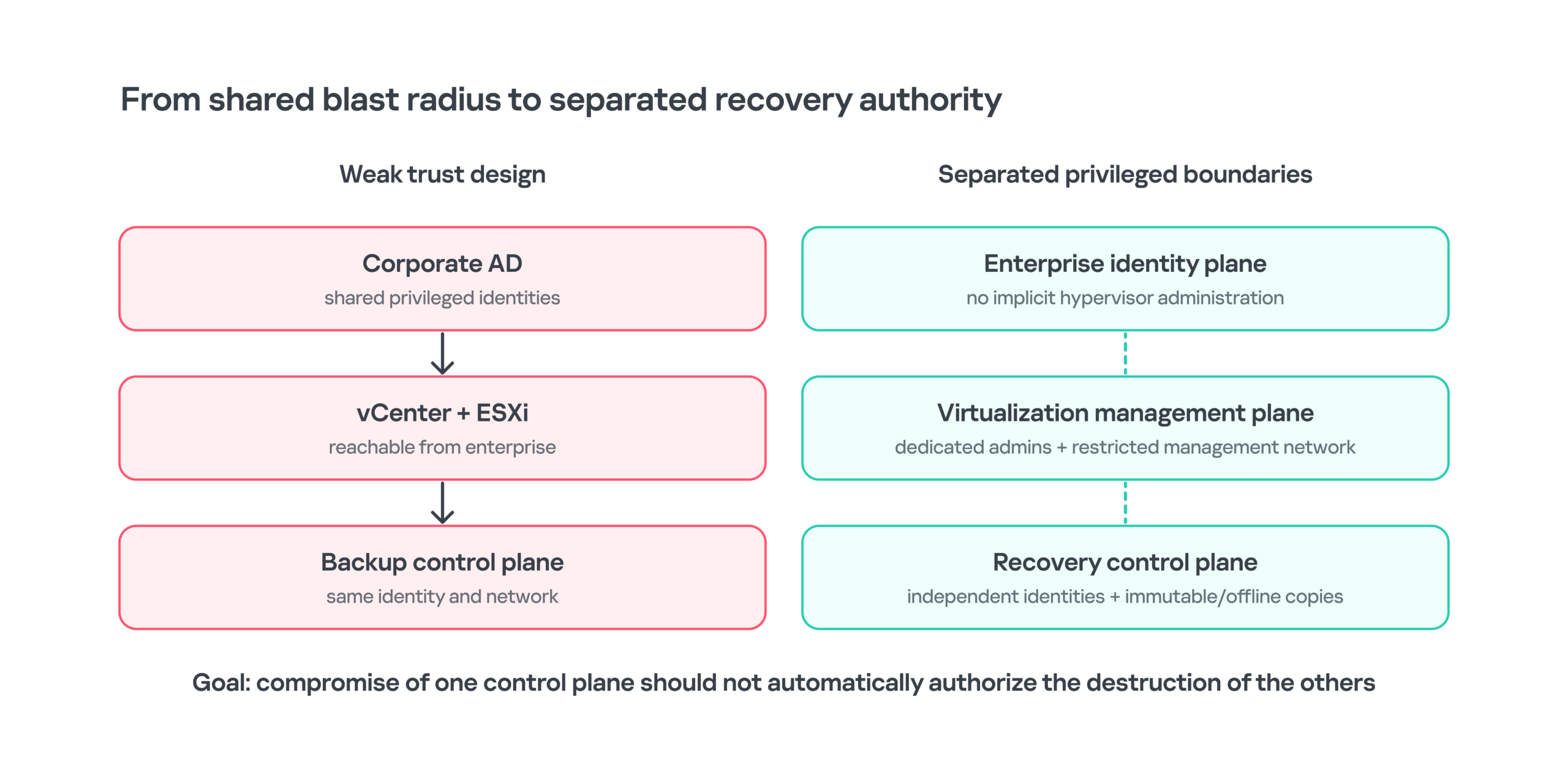
Resilience improves when enterprise identity, virtualization administration and recovery authority are separated rather than chained through shared privileged credentials
Conclusion
The central lesson from the incident in question is not that ESXi needs another endpoint agent. It is that virtualization security depends on the integrity of the management plane, the identity plane, and the recovery plane at the same time. A hypervisor can remain fully patched and protected and still become the point of maximum ransomware impact when the system authorized to manage it has already been compromised. The adversary did not need to break VMware’s cryptography or escape from a guest. Once they accessed a privileged vCenter control, a legitimate compliance mechanism could be used to change host state, enable SSH, and create a path into ESXi that looked structurally similar to normal administration activities.
The case also shows why destructive ransomware incidents are often won or lost before encryption begins. The attacker established alternate persistence, validated the ESXi payload hours before detonation, disrupted backup capability first, and then executed disruptive activities from the layer least visible to guest controls. Each stage created a detection opportunity, but those opportunities existed in management, virtualization and recovery telemetry rather than in a conventional endpoint process tree.
The durable defense is therefore architectural. Treat vCenter as Tier 0. Separate virtualization identities from ordinary enterprise administration. Keep direct ESXi access narrow. Preserve native logs outside the affected platform. Detect high-risk configuration changes as sequences rather than isolated commands. Finally, design recovery so that compromise of production identity or virtualization management does not also provide the authority needed to destroy the systems required to restore them.
MITRE ATT&CK mapping
| Technique | Name | Case relevance | Status |
| T1078 / T1078.002 | Valid Accounts / Domain Accounts | Stolen enterprise credentials used for privileged infrastructure access. | Observed / contextual |
| T1078.001 | Valid Accounts: Default Accounts | Relevant to root and vpxuser trust relationships on ESXi. | Not observed in this incident, but relevant for ESXi platform |
| T1021.004 | Remote Services: SSH | SSH used for vCenter and ESXi administration; MITRE explicitly covers ESXi SSH. | Observed |
| T1543.002 | Create or Modify System Process: Systemd Service | Ligolo-ng persisted as vmware-vdma.service on VCSA. | Observed |
| T1572 | Protocol Tunneling | Ligolo-ng created a tunneled route into the management segment. | Observed |
| T1490 | Inhibit System Recovery | Backup services and recovery infrastructure were disrupted before production impact. | Observed |
| T1486 | Data Encrypted for Impact | Virtualization workloads were rendered unavailable during the ransomware phase. | Observed impact |
Incident indicators
The following indicators were recovered during the investigation. They are incident-specific artifacts, not durable signatures for BlackNevas or any other ransomware family. Service names, filenames, domains, and VPS infrastructure can be changed or reassigned. No hashes are available for the ESXi encryptor, the Ligolo-ng binary, the agent installer script, or the credential-extraction script because those files were not available.
| Type | Indicator | Context | Confidence | Scope |
| Service | vmware-vdma | Systemd unit masquerading as a VMware service on VCSA. | High | Incident-specific |
| Service | vspbind | Windows service for the remote-management agent. | High | Incident-specific |
| Domain | api.cloudvflare[.]com | Ligolo-ng C2; one-character typosquat of cloudflare.com. | High | Incident-specific |
| IPv4 | 45.149.154[.]135 | Remote-management agent C2. | High | Incident-specific |
| IPv4 | 91.92.242[.]121 | VPS used for initial portal access. | High | Incident-specific |
| IPv4 | 31.41.33[.]212 | VPS used for initial portal access. | High | Incident-specific |
| IPv4 | 188.240.57[.]94 | VPS used for initial portal access. | High | Incident-specific |
| SHA-1 | 28f8da19ddcdf26e426875c7a834b34a79bc1c33 | svhost.exe / lock.exe. | High | Sample-specific |
| SHA-256 | 15dc419b7fbeb50c50820a7cd27997541deafa4fa710f074bb657f0149574baf | Remote-management agent. | High | Sample-specific |
| SHA-256 | 5a9b7a0d3f25757aea957713d7e84cabec87597b3474368328a8fd5ed7a12f78 | Installed remote-management agent variant. | High | Sample-specific |
Minimum virtualization forensic collection set
| Layer | Telemetry source | Investigative value |
| ESXi authentication | /var/run/log/auth.log | Source IPs, users, SSH timing, and client identifiers. |
| ESXi commands | /var/run/log/shell.log | Exact commands executed through ESXi Shell. |
| vCenter-to-host management | vpxa.log + vCenter Events/Tasks | Host Profile remediation, service changes, and administrative source. |
| Host security observations | vobd.log | execInstalledOnly, service, and security-state events. |
| Host management | hostd.log | VM and host tasks, and API/management interactions. |
| Kernel / storage | vmkernel.log + vmkwarning.log | Storage faults, world lifecycle, and VMkernel warnings. |
| Impact scale | vmksummary.log | Hourly VM count and host heartbeat. |
| VIB history | esxupdate.log | Patch / VIB installation. |
| Host Profile | hostprofiletrace.log | Profile application and compliance activity. |
| Per-VM evidence | vmware.log beside VMX | Power and device operations for individual VMs. |
| VCSA persistence | /etc/systemd/system + referenced binaries | Unauthorized services and persistence paths. |
| VCSA access | SSO logs, auth logs, wtmp, shell history | Authentication, session, and command context. |
| Backup layer | Application logs + Windows telemetry + credential-store evidence | Recovery-path compromise and credential bridge. |
| Network | Firewall / flow / proxy / DNS | vCenter-to-ESXi SSH, C2, tunneling, and management-segment pivots. |


Table of Contents
- Why the hypervisor changes ransomware economics
- The visibility asymmetry
- How attackers reach the virtualization layer
- Vulnerability exploitation
- Active Directory integration
- Credential reuse from the Windows estate
- Backup infrastructure as a credential bridge
- Persistence on the management plane
- Turning vCenter into an offensive control plane
- Why ESXi configuration change via vCenter is a trust-boundary failure
- High-fidelity detection opportunity
- Notes on ESXi abuse: living-off-the-land tools and controls to monitor
- Inside the ESXi impact phase
- Stopping virtual machines before impact
- Payload delivery and FlowSsh behavior
- Detonation command and evidence confidence
- Partial overwrite and what 2 KB actually implies
- Destroying the recovery path first
- Detection and investigation
- Incident response at the virtualization layer
- Architecture hardening derived from the case
- Treat vCenter as Tier 0
- Separate virtualization identities from ordinary enterprise administration
- Keep direct ESXi management paths narrow
- Make the logging path independent of the affected host
- Design backup as a separate security boundary
- Conclusion
- MITRE ATT&CK mapping
- Incident indicators
- Minimum virtualization forensic collection set
From the same authors





In the same category












Ransomware at the hypervisor layer: how attackers use ESXi and vCenter features for malicious purposes